Unit 1 - Using Objects and Methods¶
AP Exam Weighting: 15–25%
AP Computer Science A — Assignment Rubric
Assignment Header
All submitted documents and .java files must include the header below. This mirrors the block comment required in Main.java and follows the standard used by university CS departments.
Name:          [Your Full Name]
Partner:       [Partner's Full Name, or "None"]
Course:        AP Computer Science A
Instructor:    [Instructor Name]
Assignment:    [Assignment Number — Assignment Title]
Due Date:      [Month Day, Year]
Example:
Name:          Jordan Smith
Partner:       Alex Rivera
Course:        AP Computer Science A
Instructor:    [Instructor Name]
Assignment:    1.03.1 — Calculate Your Weight on Jupiter
Due Date:      September 12, 2026
This header must appear at the top of your
Main.javablock comment AND on your Test Cases document. Submissions missing the header will be penalized one point.
Submission Requirements
All assignments require the following unless otherwise stated:
All
.javasource file(s)Test Cases document showing inputs, expected output, actual output, and Pass/Fail result
Projects will have their own dedicated rubric and submission instructions.
5-Point Assignment Rubric
Points |
Grade |
Compilation & Output |
Documentation & Style |
Submission |
|---|---|---|---|---|
5 |
Full Credit |
Program compiles and runs without errors or warnings. Output matches expected results for all test cases. |
Block comment header fully completed. Meaningful variable names, camelCase convention, proper indentation. Inline and multi-line comments present throughout. |
All required |
4 |
Near Full Credit |
Program compiles and runs. Output is correct for most test cases with one minor error or omission. |
Block comment header complete. Comments mostly present. Minor style or formatting inconsistency. |
All required files submitted. Assignment header present. |
3 |
Partial Credit |
Program compiles but produces incorrect output for some test cases, or compiles with warnings. |
Limited comments. Block comment header partially completed. Variable names or formatting inconsistent. |
Most required files submitted. Test cases incomplete or partially documented. |
2 |
Minimal Credit |
Program has syntax or logic errors that cause significant incorrect output, or fails to fully compile. |
Little to no commenting. Block comment header missing or blank. Poor variable naming or formatting. |
A required |
1 |
Attempted |
Code submitted shows a clear attempt but does not compile or run. |
Minimal or no documentation present. |
At least one file submitted, but submission is largely incomplete. |
0 |
No Credit |
Nothing submitted, file is empty, or code is unrelated to the assignment. |
N/A |
N/A |
Academic Integrity Policy
Any submission that violates academic integrity will receive no credit and will be referred for disciplinary action in accordance with school policy.
The following are considered academic integrity violations in this course:
Submitting another student’s code as your own
Copying code from the internet without citation and modification
Allowing another student to copy your code
Sharing your source files with another student outside of an approved partner assignment
AI & External Source Use
AI tools may be used for idea generation, debugging assistance, and understanding small parts of code — not to generate complete solutions.
If you use any external source (websites, LLM/AI tools, friends), cite it in your code comments — indicate where you got help and whether any code sections came from that source.
Submitting AI-generated code as your own work — whether a whole solution or an unattributed snippet — is an academic integrity violation. Violations receive no credit and are referred for disciplinary action in accordance with school policy.
Approved Collaboration: Discussing concepts, approaches, and debugging strategies with classmates is encouraged. Writing or sharing actual code is not permitted unless the assignment is explicitly designated as a partner assignment.
Partner Assignments: Both partners must be listed in the assignment header. Both partners are equally responsible for the integrity of the submitted work.
Late Work Policy
Most work is done in class, so the late work policy is not applicable. For any assigned homework assignment, you have 1 week after the given due date to turn it in. Otherwise, you will receive a maximum of 50% for late work. With regards to Projects, you will have daily progress checks that will count for your overall grade. Failure to complete a daily progress check will lower your grade.
Grading Notes
A program that does not compile cannot earn higher than a 2.
A missing test cases document cannot earn higher than a 4.
A missing block comment header deducts 1 point from the earned score.
A missing assignment header deducts 1 point from the earned score.
Style and documentation are evaluated holistically — occasional lapses do not automatically lower a grade, but a consistent pattern does.
📋 Unit 1 Standards Alignment
Standard |
Description |
|---|---|
ICT 1.0 |
Academics — apply academic standards across content areas |
ICT 2.0 |
Communications — communicate clearly in written and electronic formats |
ICT 4.0 |
Technology — use electronic tools and reference materials |
ICT 5.4 |
Interpret information and draw conclusions to make informed decisions |
ICT 5.8 |
Create and use algorithms to solve problems |
ICT 5.9 |
Deconstruct large problems into smaller components |
ICT 5.10 |
Use multiple layers of abstraction |
ICT 5.11 |
Understand base systems including binary and hexadecimal |
ICT 7.5 |
Apply high-quality techniques to product design and development |
ICT 10.1 |
Interpret and explain ICT-specific terminology |
C4.4 |
Identify and apply data types and encoding |
C4.5 |
Demonstrate awareness of the OOP paradigm |
C4.6 |
Use proper programming language syntax |
C4.7 |
Use various data structures including objects |
C4.8 |
Use OOP concepts: properties, methods, and inheritance |
C4.9 |
Create programs using control structures, procedures, and variables |
C4.11 |
Document development work using comments |
CRP 1 |
Apply appropriate technical skills and academic knowledge |
CRP 2 |
Communicate clearly, effectively, and with reason |
CRP 4 |
Apply technology to enhance productivity |
CRP 5 |
Utilize critical thinking to make sense of problems |
CRP 7 |
Act as a responsible and contributing citizen and employee |
1.01 Introduction to Algorithms, Programming, and Compilers¶
📌 Standards — 1.01
Standard |
Description |
|---|---|
ICT 1.0 |
Academics — apply academic standards |
ICT 5.8 |
Create and use algorithms and solve problems |
ICT 10.1 |
Interpret and explain ICT-specific terminology |
C4.6 |
Use proper programming language syntax |
CRP 1 |
Apply appropriate technical skills and academic knowledge |
Learn about the Java™ programming language and create your first Java program.
I will be able to write a basic java program
Learn some basic rules of Java programming by identifying and correcting errors in code.
I will be able to identify basic syntax of a java program
Generate outputs to a console by calling System class methods.
Understand the difference between the
print()method and theprintln()method.
Java is an Object Oriented Program. Within every Java program begins with the creation of a class. Consider a class as a blueprint for your program. In this instance, we created a class called MyFirstClass. Within the class there is a main method that is required to execute the program. Below is a simple program that will print “Hello, World”.
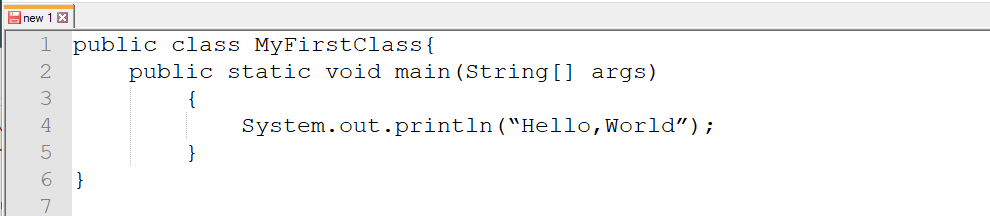
Notice that with every { there is a corresponding }. You may hear me refer to it as a curly brace. A missing curly brace is one of the most common errors among new programmers. The name public allows users to be able to see the specific parts of your program. Notice also that the name of the class starts with a capital letter. The main class will always start with a capital letter.
In Java there is a “main method” that is required for all java programs. The code will always be the same:
public static void main(String args[]) // `public` is an access specifier.
Assignment 1.01.1 — My Timeline¶
Create a personal timeline of at least seven meaningful events in your life using the
printlnmethods. The timeline will proceed vertically — earlier events near the top, later events near the bottom. Make it look professional. HINT: use\tYear Age Description 1971 0 years old Born in Long Beach 1976 5 years old Started kindergarten 1989 17 years old Graduated high school 1995 24 years old Graduated college Long Beach State 1998 27 years old Got Married 1998 27 years old Began teaching career 2021 50 years old First year at CAMSInclude seven meaningful events. No repetitive events such as “started kindergarten, started first grade, etc.”
1.01a Understanding Java — Oracle Foundations 1Z0-811¶
📌 Standards — 1.01a
Standard |
Description |
|---|---|
ICT 1.0 |
Academics — apply academic standards |
ICT 10.1 |
Interpret and explain ICT-specific terminology |
CRP 1 |
Apply appropriate technical skills and academic knowledge |
Oracle Exam Note: This section covers background knowledge tested on the Oracle Java Foundations exam (1Z0-811) — the features of Java, the JDK/JRE/JVM, how a program compiles and runs, and the parts of a basic Java program. AP CSA is project-based and skips most of this “under the hood” material, but it comes up directly on Oracle’s exam, so it’s worth knowing even though you won’t be asked to code any of it.
Identify the features that make Java a popular language.
Describe the difference between the JDK, the JRE, and the JVM.
Explain what happens when a Java program is compiled and executed.
Identify the components of a basic Java program.
Describe the purpose of the
java.langpackage.Give examples of real-world applications built with Java.
Features of Java¶
Java was designed with several core features in mind. You don’t need to memorize this list word-for-word, but you should recognize each feature and be able to explain it in your own words:
Feature |
What It Means |
|---|---|
Platform Independent |
Compiled Java code (bytecode) runs on any device with a JVM, without needing to be rewritten — “write once, run anywhere.” |
Object-Oriented |
Java organizes code around classes and objects (see Unit 1.12–1.13), which makes large programs easier to design and maintain. |
Robust |
Java catches many errors at compile time and manages memory automatically, which reduces crashes caused by common mistakes. |
Secure |
Java code runs inside the JVM in a controlled environment, which limits what a program can do to the underlying computer. |
Simple |
Java removed some of the more error-prone features of languages like C++ (such as manual memory management). |
Multithreaded |
Java can run multiple parts of a program at the same time (covered in more depth outside this course). |
Architecture-Neutral / Portable |
The same |
Oracle Exam Note: A common exam question asks you to “identify features of Java” from a list of options. Watch for wrong answers like single-threaded or architecture-dependent — these describe the opposite of how Java actually works.
JDK vs. JRE vs. JVM¶
These three acronyms are easy to confuse. Think of them as three nested layers, each one containing the one before it:
Term |
Full Name |
What It Contains |
Who Uses It |
|---|---|---|---|
JVM |
Java Virtual Machine |
The engine that actually runs bytecode ( |
Runs underneath the JRE — you never interact with it directly. |
JRE |
Java Runtime Environment |
The JVM plus the core libraries (like |
Anyone who just wants to run Java programs. |
JDK |
Java Development Kit |
The JRE plus the tools needed to write and compile Java code ( |
Programmers — this is what you installed to write code for this class. |
JDK  >  JRE  >  JVM
(write)  (run)   (execute bytecode)
Oracle Exam Note: The JVM is responsible for garbage collection and for interpreting bytecode — not the JRE or JDK by themselves. If you see an answer choice like “the JRE contains the JDK,” it’s backwards: the JDK contains the JRE.
How a Java Program Compiles and Executes¶
When you click “Run” in your IDE, several steps happen automatically. It’s worth knowing what they are:
You write source code in a file — for example,
Main.java. The file name must match the public class name exactly.The compiler (
javac) translates your source code into bytecode — a.classfile (Main.class). This step checks your code for syntax errors. If your code doesn’t compile, no.classfile is created and nothing can run.The
javacommand launches the JVM, which loads the.classfile and executes the bytecode line by line, starting at themainmethod.Runtime errors and logic errors can only appear after this point — the program compiled successfully, but produced a crash or wrong output while running.
Main.java  --(javac)-->  Main.class (bytecode)  --(java)-->  JVM executes it  -->  Output
   source code              compiled bytecode         runtime
Error Type |
When It Happens |
Example |
|---|---|---|
Syntax Error |
During compilation ( |
Missing semicolon, unmatched |
Runtime Error |
While the JVM is executing the program |
|
Logic Error |
While the JVM is executing — program runs, but output is wrong |
Off-by-one loop, wrong comparison operator |
Oracle Exam Note: Oracle’s exam often asks you to “compile and execute a Java program” from the command line:
javac Main.javafollowed byjava Main(no.classextension on the second command). This two-step process is exactly what your IDE is doing behind the scenes every time you click Run.
Understanding Java: Certification-Style Practice Questions¶
Purpose: These mirror the style of the Oracle 1Z0-811 exam — multiple choice, snippet-driven, testing why Java behaves a certain way rather than just vocabulary recall. Two parts: Part A on the compile → bytecode → JVM sequence. Part B on identifying which language feature explains a given code snippet’s behavior. Answers and explanations are in the collapsible dropdowns.
Part A — The Compile → Bytecode → JVM Sequence Practice Quiz¶
A1. Multiple Choice¶
What is produced when javac Hello.java is run successfully?
A. A platform-specific executable file (e.g.
Hello.exe)B.
Hello.class, a file of platform-independent bytecodeC. A running instance of the program in memory
D. Machine code specific to the compiling computer’s CPU
Show answer
Answer: B
javac is the Java compiler. It never produces a directly-executable machine file — it produces a .class file containing bytecode, an intermediate, platform-neutral instruction set. That bytecode is what gets handed to a JVM later, on possibly a completely different machine, to actually run.
A2. Multiple Choice¶
A student compiles Hello.java on a Windows laptop, then emails Hello.class to a friend running macOS. What must be true for the friend to run the program?
A. The friend must recompile the source code on their own machine
B. The
.classfile must be converted to a.dllfirstC. The friend needs a JVM installed for macOS — nothing else
D. It cannot run; bytecode is tied to the OS that compiled it
Show answer
Answer: C
The .class file’s bytecode is identical no matter what OS compiled it — it was never tied to Windows in the first place. All the macOS friend needs is a JVM built for macOS, which knows how to translate that same bytecode into instructions their machine understands. This is Write Once, Run Anywhere in action: the bytecode travels unchanged; the JVM is what’s platform-specific.
A3. Multiple Choice¶
Which best describes the role of the JVM once it has loaded a .class file?
A. It re-compiles the bytecode back into Java source code
B. It translates and executes the bytecode, instruction by instruction, for the host machine
C. It stores the bytecode permanently without running it
D. It converts the bytecode into a different
.classfile for the next run
Show answer
Answer: B
The JVM is an interpreter (often paired with a Just-In-Time compiler for speed) that reads bytecode and carries out the equivalent operations on the real hardware/OS underneath it. It doesn’t reverse-engineer source code, and it doesn’t just archive the bytecode — its whole job is to execute it.
A4. Short Answer¶
Put these four items in the correct order for how a Java program goes from source code to a running program: JVM interprets bytecode, .java source file written, javac compiles source, .class bytecode file created.
Show answer
Answer:
.javasource file writtenjavaccompiles source.classbytecode file createdJVM interprets bytecode
Why it matters: Steps 1–3 happen once, at development time, and produce something portable. Step 4 happens every time the program is run, and is the only step that’s different depending on the machine.
A5. Multiple Choice¶
Why does each operating system need its own version of the JVM, if bytecode itself is platform-independent?
A. Bytecode is actually different on every OS, so each JVM reads a different format
B. The JVM has to translate the same bytecode into real instructions for that OS’s specific hardware and system calls
C. Licensing requires a separate JVM per OS for legal reasons only
D. Without a separate JVM,
.classfiles would be too large to run
Show answer
Answer: B
Bytecode itself never changes between platforms — that’s the whole point. What does need to change is the piece that turns bytecode into real, executed instructions, because Windows, macOS, and Linux each have different low-level system calls and hardware interaction. The JVM absorbs all of that platform-specific complexity so the bytecode above it never has to know about it.
Part B — Identifying the Feature Behind the Behavior¶
Identify which Java feature (Platform Independence, Compiled + Interpreted, Object-Oriented, Static/Strong Typing, Automatic Memory Management, Robust/Secure) best explains the behavior described.
B1.¶
int total = "42";
This line fails to compile, with an error before the program ever runs.
Show answer
Feature: Static / Strong Typing
Java checks variable types at compile time. Assigning a String to an int variable violates the declared type, so javac rejects it immediately — the mismatch never has a chance to become a runtime problem, because the program never gets to run at all.
B2.¶
public class Car {
    private int speed;
    public void accelerate() { speed += 10; }
}

public class SportsCar extends Car {
    public void accelerate() { speed += 25; }
}
SportsCar reuses Car’s structure but customizes how accelerate() behaves.
Show answer
Feature: Object-Oriented (Inheritance + Polymorphism)
SportsCar inherits from Car, reusing its fields and methods, and then overrides accelerate() to provide its own behavior — a form of polymorphism. This kind of code reuse and specialization only works because Java organizes programs around classes and objects with inheritance relationships.
B3.¶
A student writes a method that creates thousands of temporary String objects inside a loop. The student never writes any code to delete or free those objects, yet the program’s memory usage doesn’t grow without bound.
Show answer
Feature: Automatic Memory Management (Garbage Collection)
Once those temporary String objects are no longer referenced by anything the program can reach, Java’s garbage collector automatically identifies them as unreachable and reclaims their memory — without the programmer ever writing a free() or delete call.
B4.¶
The exact same .class file, compiled once on a school’s Windows lab computer, runs correctly on a student’s Chromebook and a teacher’s MacBook without being recompiled.
Show answer
Feature: Platform Independence
The .class file contains bytecode, not machine code — it isn’t tied to Windows. Each device (Chromebook, MacBook) supplies its own JVM, which translates that identical bytecode into instructions appropriate for its own OS and hardware. This is Write Once, Run Anywhere.
B5.¶
public static void main(String[] args) {
    int[] numbers = {1, 2, 3};
    System.out.println(numbers[5]);
}
This code compiles successfully, but throws an ArrayIndexOutOfBoundsException when run, instead of silently corrupting memory or crashing the whole system.
Show answer
Feature: Robust / Secure
Java checks array bounds at runtime and throws a catchable exception rather than allowing the program to read or write memory it shouldn’t touch. This is part of why Java is described as robust and secure — it fails safely, with a specific, handleable error, instead of causing undefined behavior.
B6.¶
The program’s source file compiles in under a second, but the compiled file cannot actually be run directly by double-clicking it on any operating system — a separate program has to be launched first to read it.
Show answer
Feature: Compiled + Interpreted (two-step execution)
Compilation (javac) only gets you to bytecode — an intermediate form, not a native executable. Running it still requires the interpretation step, where the JVM reads that bytecode and carries it out. Neither step alone produces a runnable program on its own; Java needs both.
Anatomy of a Basic Java Program¶
Every Java program follows the same basic structure. Here’s each part labeled:
public class Main {                          // 1. Class declaration — must match the filename (Main.java)

    public static void main(String[] args) {  // 2. The main method — entry point; execution always starts here
        System.out.println("Hello, World");   // 3. A statement — always ends in a semicolon
    }                                          // end of main method block

}                                              // end of class block
Part |
Purpose |
|---|---|
Class declaration |
Every Java file has at least one class. If the class is |
|
The starting point of any runnable Java program. Its signature ( |
Statements |
Individual instructions, each ending in a semicolon |
Blocks |
Group statements together — a class body, a method body, a loop body, etc. |
(Optional) |
Placed above the class declaration, used to bring in classes from other packages (see Unit 1.07). |
Oracle Exam Note: A frequent Oracle exam trap is a file where the public class name does not match the filename — this is a compile-time error, not a warning.
The java.lang Package¶
java.lang is the one package in Java’s standard library that is automatically imported into every program — you’ll never write import java.lang.*; because Java does it for you. It contains the classes you already use constantly without thinking about it:
Class |
What It’s For |
|---|---|
|
Text data |
|
Math operations like |
|
Wrapper classes for primitives (see Unit 1.17) |
|
Console output ( |
|
The superclass every Java class inherits from, whether you write |
Compare this to java.util (Scanner, ArrayList, Random) and java.time (LocalDate, LocalTime) — both of which do require an explicit import statement. java.lang is the exception, not the rule.
Real-World Applications of Java¶
Java shows up in far more places than classroom assignments. A few examples worth knowing:
Android app development — most native Android apps are built with Java or Kotlin (which runs on the same JVM).
Enterprise back-end systems — banks, insurance companies, and large businesses run huge Java systems to process transactions.
Web servers and web applications — frameworks like Spring power many websites’ back ends.
Big data tools — systems like Hadoop are written in Java.
Embedded systems — Java runs on everything from smart cards to set-top boxes.
1.02 Variables and Data Types¶
📌 Standards — 1.02
Standard |
Description |
|---|---|
ICT 1.0 |
Academics — apply academic standards |
ICT 5.8 |
Create and use algorithms and solve problems |
ICT 5.9 |
Deconstruct large problems into components |
ICT 10.1 |
Interpret and explain ICT-specific terminology |
C4.4 |
Identify and apply data types and encoding |
C4.6 |
Use proper programming language syntax |
C4.9 |
Create programs using variables and control structures |
CRP 1 |
Apply appropriate technical skills and academic knowledge |
CRP 5 |
Utilize critical thinking to make sense of problems |
Learn to use variables so that the same algorithm runs using different input values.
Determine the appropriate use for specific variables and data types.
I will be able to write a program using primitive and non-primitive types.
There are eight primitive types in Java: int, double, boolean, float, char, byte, long, and short.
For this course we will primarily use int, double, and boolean.
int— whole numbers; uses 32 bits of memorydouble— 64-bit decimal numbersboolean— true or false valuesfloat— 32-bit decimal numbers; uses less memory thandoublechar— 16-bit Unicode character (\u0000to\uffff)byte— 8-bit integer, range −128 to 127long— 64-bit integer, range −2^63 to 2^63 − 1short— 16-bit integer, range −32,768 to 32,767
Non-primitive data types include String, Arrays, and Classes:
String — a collection of characters enclosed in quotes
Arrays — used to store multiple values (think ‘list’)
Class — a blueprint/constructor for creating objects
Variable Naming Convention
Always choose a name that indicates the purpose of the variable
A variable cannot begin with a number
A variable must not have spaces
A variable cannot begin with any special characters
A variable cannot have the same name as a Java keyword
When you declare a variable, you must state the variable type along with the variable name followed by the value assignment: int height = 72;
Once you have declared the variable type, you do not need to do it again to reassign a value to the variable. If you declare a variable as final you cannot change the value of it. final variables are written as ALL CAPS.
Assignment 1.02.1 — Allowance
Write a program that will determine who receives an allowance or not. Use the information below as a guide:
Allowance is always $30.00/week
Non-teenagers do not receive an allowance
Jon is 16 years old; Ed is 12 years old; Michael was born four years before Jon
Print out who receives an allowance and who does not using
int,double, andbooleanvariables.Submit your program as a
.javafile and include test cases that your program worked as intended
Starter Code
// Name:          [Your Full Name]
// Partner:       [Partner's Full Name, or "None"]
// Course:        AP Computer Science A
// Instructor:    [Instructor Name]
// Assignment:    [Assignment Number — Assignment Title]
// Due Date:      [Month Day, Year]

public class Allowance {

    public static void main(String[] args) {

        // ---------------------------------------------------
        // STEP 1: Declare the allowance amount
        // ---------------------------------------------------
        // This is money, so it needs a decimal type, not int.
        // Hint: the type for decimal numbers is "double"
        double weeklyAllowance = 0 ; //TODO: insert the weekly allowance value


        // ---------------------------------------------------
        // STEP 2: Declare each person's age as an int
        // ---------------------------------------------------
        // Jon and Ed are done for you as examples.
        // You need to figure out Michael's age yourself —
        // re-read the rules above carefully.

        int jonAge = 16;
        int edAge = 12;
        int michaelAge = 0;   // TODO: replace 0 with the correct value


        // ---------------------------------------------------
        // STEP 3: Declare a boolean for each person
        // ---------------------------------------------------
        // A boolean can only be true or false.
        // "Teenager" means the age is between 13 and 19 (inclusive).
        //
        // Jon's is done for you as an example of the pattern.
        // You need to write the boolean expression for Ed and Michael.

        boolean jonIsTeenager = (jonAge >= 13 && jonAge <= 19);
        boolean edIsTeenager = false;      // TODO: replace with a real expression
        boolean michaelIsTeenager = false; // TODO: replace with a real expression


        // ---------------------------------------------------
        // STEP 4: Print the result for each person
        // ---------------------------------------------------
        // Use an if/else with each person's boolean to decide
        // what gets printed. Jon's is done as an example —
        // do the same thing for Ed and Michael below it.

        if (jonIsTeenager) {
            System.out.println("Jon (" + jonAge + ") receives an allowance of $" + weeklyAllowance);
        } else {
            System.out.println("Jon (" + jonAge + ") does NOT receive an allowance.");
        }

        // TODO: write the if/else for Ed, following the same pattern


        // TODO: write the if/else for Michael, following the same pattern


        // ---------------------------------------------------
        // STEP 5: Test cases
        // ---------------------------------------------------
        // Below main(), explain (as a comment) what
        // output you EXPECTED for each person, and confirm
        // whether the program's actual output matched it.
        //
        // Example:
        // Expected: Jon (16) receives an allowance of $30.00  -> MATCHES actual output
        // Expected: Ed (12) does NOT receive an allowance.   -> MATCHES actual output
        // Expected: Michael (??) does NOT receive an allowance. -> TODO: fill in once you find his age

    }
}
Assignment 1.02.2 — Scanner Class
The Scanner class is a package that provides primitive input within Java programs. It can be found in the java.util Package.
To create an object of the Scanner class, we must pass
System.inas the defined object.To read the data type we need to use the function
next<DataType>(). For example, to read anintusenextInt().To read strings, use
nextLine().Create four questions that will ask the user for a
String,int,double, and aboolean.Submit your program as a
.javafile and include test cases that your program worked as intended
Starter Code
// Name:          [Your Full Name]
// Partner:       [Partner's Full Name, or "None"]
// Course:        AP Computer Science A
// Instructor:    [Instructor Name]
// Assignment:    1.02.2 — Scanner Class
// Due Date:      [Month Day, Year]

/* ============================================================
 * GOAL
 * Use the Scanner class to ask the user four questions and
 * read their input as four different data types:
 *   - String
 *   - int
 *   - double
 *   - boolean
 *
 * REMINDERS FROM THE ASSIGNMENT
 *   - Scanner lives in the java.util package — you must import it.
 *   - To create a Scanner, pass System.in to it.
 *   - To read a data type, use next<DataType>()  e.g. nextInt()
 *   - To read a String, use nextLine()
 *
 * A NOTE BEFORE YOU START
 * Mixing nextLine() with nextInt(), nextDouble(), or
 * nextBoolean() in the same program can cause an input to
 * get silently skipped. If that happens to you, that's a real
 * and common Scanner bug — figure out why before asking for
 * help. What does nextInt() leave behind in the input that
 * nextLine() then picks up?
 * ============================================================ */

import java.util.Scanner;


public class ScannerDemo {

    public static void main(String[] args) {

        // ---------------------------------------------------
        // Example: creating the Scanner object
        // ---------------------------------------------------
        Scanner scanner = new Scanner(System.in);


        // ---------------------------------------------------
        // Example: one full question, start to finish
        // (String input, read, and print)
        // ---------------------------------------------------
        System.out.println("What is your name?");
        String name = scanner.nextLine();
        System.out.println("Hello, " + name + "!");


        // ---------------------------------------------------
        // Your turn — follow the same pattern above for each
        // of the remaining data types.
        // ---------------------------------------------------

        // TODO: ask the user a question that expects an int answer,
        //       then read, store, and print it


        // TODO: ask the user a question that expects a double answer,
        //       then read, store, and print it


        // TODO: ask the user a question that expects a boolean answer,
        //       then read, store, and print it


    }
}

/* ============================================================
 * TEST CASES
 * ------------------------------------------------------------
 * Run your program at least twice with different inputs.
 * For each run, record what you TYPED and what the program
 * PRINTED BACK, and note whether it matched what you expected.
 *
 * ============================================================ */
1.03 Expressions and Output¶
📌 Standards — 1.03
Standard |
Description |
|---|---|
ICT 1.0 |
Academics — apply academic standards |
ICT 5.8 |
Create and use algorithms |
ICT 5.9 |
Deconstruct large problems into components |
ICT 5.11 |
Understand base systems including binary and hexadecimal |
C4.6 |
Use proper programming language syntax |
C4.9 |
Create programs using control structures, variables, functions |
CRP 1 |
Apply appropriate technical skills and academic knowledge |
CRP 5 |
Utilize critical thinking to make sense of problems |
Describe the functionality of a program using a single-line comment.
Use operators to construct compound expressions.
Evaluate the results of an expression with an assignment statement.
I will understand and practice proper commenting in programming
Symbol |
Name |
Usage |
|---|---|---|
( ) |
Parentheses |
Evaluate based on what is within the parentheses |
* |
Multiplication |
Multiply two values together |
/ |
Division |
Divide two values |
% |
Modulo |
The remainder after dividing two values |
+ |
Addition |
Add two values together |
- |
Subtraction |
Subtract two values |
Note: When you divide an integer by zero your program will return an ArithmeticException error.
Assignment 1.03.1 — Calculate Your Weight on Jupiter
Using the equation below, calculate what your weight would be on different planets:
weightOnPlanet = (weightOnEarth / earthGravity) × planetGravityAdd 3 more planets that you will travel to.
Planet
Acceleration Due to Gravity (m/sec²)
Earth
9.81
Mercury
3.59
Venus
8.87
Mars
3.711
Jupiter
24.79
Saturn
11.08
Uranus
10.67
Neptune
11.15
Starter Code
// Name:          [Your Full Name]
// Partner:       [Partner's Full Name, or "None"]
// Course:        AP Computer Science A
// Instructor:    [Instructor Name]
// Assignment:    [Assignment Number — Assignment Title]
// Due Date:      [Month Day, Year]

public class GalaxyWeight{
 	public static void main(String[] args)
 	{
     // declare and initialize weightOnEarth, earthGravity, and jupiterGravity
     int weightOnEarth = 177;
     double earthGravity = 9.81;
     double jupiterGravity = 24.79;

     // calculate weight
     double weightOnJupiter = weightOnEarth * jupiterGravity / earthGravity;

     // show results
     System.out.print("Your weight on Jupiter is ");
     System.out.print(weightOnJupiter);
     System.out.println(" lbs.");
  }
}
Assignment 1.03.2 — Simple Math
Create a program that will ask the user for two distinct integers
Use the Scanner class to receive input from the user
Store those values and perform addition, subtraction, multiplication, division, and modulo
No Starter Code for this assignment
Submit your .java code and test cases (as either a comment or as a png)
1.04 Assignment Statements and Input¶
📌 Standards — 1.04
Standard |
Description |
|---|---|
ICT 1.0 |
Academics — apply academic standards |
ICT 5.8 |
Create and use algorithms |
ICT 5.9 |
Deconstruct large problems into components |
C4.6 |
Use proper programming language syntax |
C4.9 |
Create programs using control structures and variables |
CRP 1 |
Apply appropriate technical skills and academic knowledge |
CRP 5 |
Utilize critical thinking to make sense of problems |
Use the compound assignment and increment/decrement operators in a program.
I will be able to increment a variable based on java protocol
Java supports Compound Assignment Operators which perform a mathematical calculation and assignment in one step:
+=   assigns the result of the addition.
-=   assigns the result of the subtraction.
*=   assigns the result of the multiplication
/=   assigns the result of the division.
%=   assigns the remainder of the division.
Increment and Decrement Operators
The increment operator (++) increases the value of a variable by 1. The decrement operator (--) decreases it by 1.
int a = 5;
System.out.println("a = " + ++a);  // a = 6 (pre-increment)
int b = 5;
System.out.println("b = " + b++);  // b = 5 (post-increment: original returned first)
Assignment 1.04.1 — Compound Operators
public class CompoundOperators
{
  public static void main(String[] args)
  {
    // TODO 1) Add at least three other people to your program below,
    //         such as siblings, friends, or neighbors.
    // TODO 2) Use people that are in different grades, to validate that
    //         your program works for different school grades.
    // TODO 3) For each person's years in school, use a value that shows
    //         they will soon be halfway through their current school
    //         year — the same way "years" is set up below.

    int numPeople = 0;
    double totalYears = 0;

    double years = 11.5;  // I will soon be halfway through my junior year.

    // Rewrite these two statements using compound assignment
    // and/or increment/decrement operators.
    totalYears = totalYears + years;
    numPeople = numPeople + 1;

    // Repeat the pattern above for each additional person you add.


    // TODO 4) Calculate the average years you and your friends, siblings,
    //         and neighbors have been in school.
    double averageYears;


    // TODO 5) Calculate the total days you have all been in school,
    //         assuming 180 days per year in school.
    double totalDays;


    // TODO 6) Calculate the average days you have all spent in school.
    double averageDays;


    // Summary output — do not edit below this line.
    System.out.printf("Number of people: %d%n", numPeople);
    System.out.printf("Total years in school: %.1f%n", totalYears);
    System.out.printf("Average years in school: %.2f%n", averageYears);
    System.out.printf("Total days in school: %.1f%n", totalDays);
    System.out.printf("Average days in school: %.2f%n", averageDays);
  }
}
Format String using - printf¶
Explanation of printf for students:
System.out.printf works like System.out.println, but it lets you control exactly how a value is formatted using a format string with placeholders.
The first argument is a string containing format specifiers — placeholders that start with
%and tell Java where to insert a value and how to display it.Each specifier is matched, in order, to one of the arguments listed after the format string.
%ninserts a new line (preferred over\nbecause it adapts to the operating system).
Common specifiers used above:
Specifier |
Meaning |
Example |
|---|---|---|
|
integer (decimal) |
|
|
floating-point number |
|
|
floating-point, rounded to 1 decimal place |
|
|
floating-point, rounded to 2 decimal places |
|
So this line:
System.out.printf("Average years in school: %.2f%n", averageYears);
takes the value stored in averageYears, formats it as a decimal rounded to two places, inserts it in place of %.2f, and then moves to a new line.
One thing worth pointing out to students: %d only works with integer types (int, long) — using it with a double throws an IllegalFormatConversionException. That’s a useful error for them to hit and debug once, since it reinforces why numPeople is an int while the others are double.
Assignment 1.04.2 — Average Test Score / Cashier Totals
Directions: No starter code will be provided for the program below. Write two programs that will do the following:
Average Test Score
ask the user for four test scores
calculate and show the result
Use
printfand round the output of the test scores to two decimal placesCashier Totals
ask the user for the number of burgers sold and how much each one costs
ask the user for the number of fries sold and how much each costs
display the total items sold
display the total sales
Use
printfand round the output of the total sales to two decimal places & include the dollar sign.Submit your program
.javafile and your test cases for each each program.Sample Output:
Enter the first test score:
95
Enter the second test score:
87.5
Enter the third test score:
73.2
Enter the forth test score:
75

Average test score: 82.75%
======================================
Enter the number of burgers ordered:
10
Price of a burger:
5.65
Enter the number of fries ordered:
4
Price of fries:
1.95

Total Items Sold: 14
Total Sales: $64.30
#############################################################################
1.05 Casting and Range of Variables¶
📌 Standards — 1.05
Standard |
Description |
|---|---|
ICT 1.0 |
Academics — apply academic standards |
ICT 5.4 |
Interpret information and draw conclusions to make informed decisions |
ICT 5.8 |
Create and use algorithms |
C4.4 |
Identify and apply data types and encoding |
C4.6 |
Use proper programming language syntax |
CRP 1 |
Apply appropriate technical skills and academic knowledge |
CRP 5 |
Utilize critical thinking to make sense of problems |
Evaluate arithmetic expressions that use manual and automatic casting.
Perform mathematical rounding.
I will be able to explain why a code segment will not compile or work as intended.
There are some unique features to Java that help programmers create programs that are flexible in how they display data. We learned earlier that we need to declare a variable by it’s type. It can be an int or a double. As you may remember, an int is any whole negative or positive number.
A double is any number with a decimal. 1.0 is a whole number, but it has a decimal. So, Java considers 1.0 as a double. We can convert the double by declaring a new variable that changes the double to an int. Casting is converting from one data type to another, such as from a double to an int, potentially losing data.
double temp = 98.6;
int newTemp = (int)temp;  // newTemp = 98 (truncated, NOT rounded)
double a = 3.9;
int b = (int) a;
System.out.println(b); // b is 3

double c = -4.8;
int d = (int) c;
System.out.println(d); // d is -4
In both cases, the digits to the right of the decimal are is just chopped off:
To fix this, you can use
Math.round(x)***(we will get to this later, as a class)***or you can add .5 to correct the problem.
double a = 3.9;int b = (int) a + .5;System.out.println(b); // b is 4double c = -4.8;int d = (int) c + .5;System.out.println(d); // d is -5
You will need to be familiar with some terms:
widening — converting from a smaller data type to a larger:
byte→short→char→int→long→float→doublenarrowing — converting from a larger data type to a smaller:
double→float→long→int→char→short→byte
In this instance, we ‘narrowed’ the value of temp. There is another term that you need to be familiar with and it is called casting. Casting is converting from one data type to another, such as from a double to an int, potentially losing data.
Let’s take a deeper look! Take a look at the two images below. Take a look at the two images below. The first image is just latitude and longitude. The second image includes minutes and seconds.
The distance between the two points is approximately 87 km (54 miles). That comes from converting 33°46’12.4”N, 118°11’37.3”W to decimal (33.7701°N, 118.1937°W) and comparing it to the plain 33°N, 118°W point — roughly 85.5 km of that is north-south drift and about 18 km is east-west drift.
Why widening = precision: a whole-degree coordinate like 33, 118 isn’t just “less exact” it is genuinely ambiguous. One degree of latitude spans about 111 km, and one degree of longitude at that latitude spans about 93 km, so 33°N, 118°W alone could mean any point inside an ~87 km-wide circle — the shaded area in the first image. Nothing is lost by writing it that way, because nothing more precise was ever captured.
Adding minutes and seconds doesn’t discard anything, it actually adds more information on top of what’s already there: 33° is still 33°, you’re just specifying where within that degree you are, down to about 30 meters per arcsecond. That’s exactly why int → double is a widening conversion in Java: every int value is already a perfectly valid double, and widening just gives it room to carry more fractional detail. No cast is required because you can’t lose information by gaining precision — only by throwing it away, which is what (int) latitude does going the other direction.
Take a look at this program:
public class CastingEggs {
  public static void main(String args[]) {
    int eggs = 9;
    final int dozen = 12;// the variable dozen will not change

    System.out.println("Total eggs = " + eggs/dozen + " dozen");
    System.out.println("Total eggs = " + eggs/ (double)dozen + " dozen"); <-- On the AP Exam
    System.out.println("Total eggs = " + (double)eggs/ dozen + " dozen"); <-- On the AP Exam

// Example output:
// Total eggs = 0 dozen
// Total eggs = 0.75 dozen
// Total eggs = 0.75 dozen
We know that we don’t have 0 eggs. We can rewrite our program to show how many eggs we have in decimal form.
#############################################################################
Assignment 1.05.1 — FivePlanetTravel¶
You will explore the PlanetTravel program called FivePlanetTravel. The program is set up to plan a five-planet tour!
Starter Code:
public class FivePlanetTravel
{
  public static void main(String[] args)
  {
    // theplanets.org average distance from earth to the planets
    int mercury = 56974146;
    int venus = 25724767;
    int mars = 48678219;
    int jupiter = 390674710;
    int saturn = 792248270;
    // number of planets to visit
    int numPlanets = 5;
    // speed of light and our speed
    int lightSpeed =  670616629;
    lightSpeed /= 10;
    // total travel time
    double total = 0;

    /* your code here */

    System.out.println("Travel time to ...");
    System.out.println("Mars: " + mars / (double) lightSpeed + " hours");
    total +=  mars / (double) lightSpeed;


    int average = (int)(total / numPlanets);
    System.out.println("Total travel time:" + total);
    System.out.println("Average travel time: " + average);
  }
}
Example Output:
Travel time to ...
 Mercury 0 hours
 Venus: 0 hours
 Mars: 0 hours
 Jupiter: 5 hours
 Saturn:11 hours
Total travel time:16.0

Travel time to ...
 Mercury: 0.8495784968765016 hours
 Venus: 0.38359870949813324 hours
 Mars: 0.7258725410056196 hours
 Jupiter: 5.825604352006665 hours
 Saturn: 11.813728535388819 hours
Total travel time:19.59838263477574

Average travel time: approximately 4 hours.
Your output should look similar to the example above. You will write a widening algorithm that shows the travel time to and from all planets using casting. Use printf to widen the the time to 10 decimal places. The one rule is that you must use the provided code and not change any provided data types.
#############################################################################
1.06 Compound Assignment Operators¶
(See section 1.04 — covered in depth with compound assignment operators and prefix/postfix increment/decrement.)
#############################################################################
1.07 Application Program Interface (API) and Libraries¶
📌 Standards — 1.07
Standard |
Description |
|---|---|
ICT 4.0 |
Technology — use electronic tools and reference materials |
ICT 4.1 |
Use electronic reference materials to gather information |
ICT 4.5 |
Research technological advances in computing |
ICT 10.9 |
Use common industry-standard software applications |
C4.2 |
Describe interaction of programming languages and protocols |
C4.3 |
Identify and use IDEs and authoring tools |
CRP 4 |
Apply technology to enhance productivity |
CRP 11 |
Employ valid and reliable research strategies |
Understand what an API is and how Java libraries provide pre-built functionality.
Import and use packages from the Java standard library.
Explain where objects are stored in memory when created with
new.
Java’s standard library (API) provides pre-built classes and methods organized into packages:
Pick one Java library or API from the list below (or propose your own with instructor approval). Research it and write a short “scouting report” answering the four questions in the table.
Where to look |
What you’ll find there |
|---|---|
Oracle Java SE API Docs |
Official documentation for every built-in package (java.util, java.time, java.nio, etc.) |
Maven Central |
Searchable repository of third-party Java libraries |
GitHub |
Source code, README files, and real usage examples for open-source Java projects |
Baeldung |
Tutorials and comparisons of popular Java libraries |
Suggested APIs/libraries to scout (mix of built-in and third-party, so students see both):
java.time (dates/times) vs. the older java.util.Date
java.util.regex (pattern matching)
Apache Commons Lang
Gson or Jackson (JSON parsing)
JUnit (testing)
java.awt / Swing or JavaFX (GUI)
Scouting Report Questions (slideshow):
What does it do? Summarize the library’s purpose in your own words.
Where did you find it, and how do you know it’s trustworthy? (Official docs? Star count/activity on GitHub? Widely cited in tutorials?)
Why use this instead of writing the code yourself? Consider time, reliability, and whether you’d realistically get it right on the first try.
How would it improve a program’s outcome? Think in terms of: fewer bugs, more readable code, faster development, handling edge cases you hadn’t considered.
Rubric
Criteria |
Points |
|---|---|
student(s) 2-minute “pitch” to the class |
1 |
Accurately explains what the library does |
1 |
Formats & cites a credible, specific source (not just “I googled it”) |
1 |
Gives a concrete reason for using it over hand-rolled code |
1 |
Connects the library to a real outcome (fewer bugs, readability, speed) |
1 |
Total |
5 |
#############################################################################
1.07a Where Do Objects Live? — Heap Memory¶
Every time your program uses new to create an object — a Scanner, a Random, a String — Java needs somewhere to store it. That somewhere is called the heap.
The heap is the part of your computer’s memory where Java stores objects — anything created with the new keyword. Think of it like a giant storage warehouse. Every time your program runs new Scanner(System.in) or new Random(), Java rents out a chunk of space in that warehouse, puts the object in it, and hands you back an address (called a reference) so you can find it later.
Your variable doesn’t hold the object — it holds the address of where the object lives in the warehouse.
Scanner input = new Scanner(System.in);
//      ↑                   ↑
//  address tag        the actual object — stored in the heap
This is why two variables can point to the same object:
Scanner a = new Scanner(System.in);
Scanner b = a;             // b gets a COPY of the address, not a copy of the Scanner

// a and b are now pointing at the SAME Scanner object in the heap
When nothing holds that address anymore, Java’s garbage collector sweeps through the warehouse and clears out the unclaimed space automatically — unlike languages like C++ where you’d have to clean it up yourself. This is one of Java’s key safety features.
#############################################################################
Heap vs. Stack — The Quick Contrast¶
Java actually uses two memory areas your programs interact with constantly:
Stack |
Heap |
|
|---|---|---|
Stores |
Local variables & method calls |
Objects ( |
Size |
Small, fixed |
Large, flexible |
Managed by |
Automatically (method returns) |
Garbage collector |
Speed |
Very fast |
Slower |
public static void main(String[] args)
{
    int x = 5;                        // x lives on the STACK — primitive, gone when method ends
    Scanner input = new Scanner(System.in);  // Scanner object lives in the HEAP
                                             // input is just the address
}
// When main() finishes: x is gone instantly
// The Scanner object stays in the heap until the garbage collector clears it
null — An Address That Points to Nothing¶
Because variables hold addresses, it is possible to have a variable that holds no address at all. That value is null.
Scanner input = null;   // input holds no address — points to nothing in the heap
input.nextLine();       // NullPointerException — you followed a blank address label
This is one of the most common runtime errors in Java. You will see it often, and now you know exactly why it happens.
The String Pool — A Special Section of the Heap¶
The heap has one special region called the String pool. When you create a String using a literal (quotes), the JVM checks the pool first — if that String already exists, it reuses the same object rather than creating a new one.
String s1 = "hello";              // JVM creates "hello" in the pool
String s2 = "hello";              // JVM gets the reference to the same pooled object `s1` points to
String s3 = new String("hello");  // forces a brand-new object in the heap, bypasses pool

System.out.println(s1 == s2);         // true  — same address in the pool
System.out.println(s1 == s3);         // false — s3 is a different heap object
System.out.println(s1.equals(s3));    // true  — same content
⚠️ Oracle Exam Note: Always use
.equals()to compare String content — never==. The==operator compares addresses, not content, and the String pool makes its behavior unpredictable.
#############################################################################
1.07b Packages & APIs¶
When you write a Java program, you do not have to build everything from scratch. Java provides thousands of pre-built classes organized into packages. A package is a folder of related classes. Together, all of these packages make up the Java standard library.
An Application Programming Interface (API) is the set of rules and definitions that describes how you interact with a library — what classes are available, what methods they have, what parameters they take, and what they return. Think of the API documentation as the instruction manual for the library.
To use a class from a package that is not automatically included, you must import it:
import java.util.Scanner;   // imports the Scanner class from the java.util package
import java.util.Random;    // imports the Random class from the java.util package
java.lang (which contains String, Math, Integer, etc.) is imported automatically — you never need to import it manually.
#############################################################################
Assignment 1.07.1 — Heap Detective: Tracing References & Memory¶
📌 Standards — 1.07.1
Standard |
Description |
|---|---|
ICT 5.4 |
Interpret information and draw conclusions to make informed decisions |
ICT 5.8 |
Create and use algorithms to solve problems |
ICT 5.9 |
Deconstruct large problems into smaller components |
ICT 5.10 |
Use multiple layers of abstraction |
ICT 10.1 |
Interpret and explain ICT-specific terminology |
C4.5 |
Demonstrate awareness of the OOP paradigm |
C4.7 |
Use various data structures including objects |
C4.9 |
Create programs using control structures, procedures, and variables |
CRP 1 |
Apply appropriate technical skills and academic knowledge |
CRP 5 |
Utilize critical thinking to make sense of problems |
#############################################################################
🧰 Supplies Needed
Computer with VS Code / Coding Rooms set up (for Parts A and C)
Printed or blank paper for Part B — one sheet per student (memory diagrams are hand-drawn, not typed)
Pencil or pen (not a computer) for Part B — sketching stack/heap boxes by hand is the point
Ruler or straightedge (optional, but helps students draw clean boxes/arrows for the stack and heap regions)
This assignment handout (printed or displayed) — Part A must be attempted before running any code
By the end of this activity you will be able to:
Predict how a program will behave when two variables reference the same object
Distinguish reference (aliasing) behavior from primitive copy behavior
Draw an accurate stack/heap diagram for a short code snippet
Explain, in your own words, when an object becomes eligible for garbage collection
Part A — Predict the Output
Do this section on paper first. Do not run any code until every prediction is written down.
For each snippet below: (1) write your predicted output, (2) run it, (3) if you were wrong, write one sentence explaining what you misunderstood.
// Snippet 1 — aliasing
int[] arr1 = {1, 2, 3};
int[] arr2 = arr1;
arr2[0] = 99;
System.out.println(arr1[0]);   // predict, then explain WHY
// Snippet 2 — primitives don't alias int x = 5; int y = x; y = 10; System.out.println(x); // predict, then explain WHY this differs from Snippet 1// Snippet 3 — null trap Scanner s = null; if (s == null) { System.out.println("caught it"); } else { s.nextLine(); // would this crash if the if weren't there? }// Snippet 4 — String pool String a = "cat"; String b = "cat"; String c = new String("cat"); System.out.println(a == b); System.out.println(a == c); System.out.println(a.equals(c));Part B — Draw the Memory Diagram
On paper. Draw two labeled boxes: Stack and Heap. For the code below, place every variable and object correctly, with arrows showing which variable points to which object in the heap.
public static void main(String[] args) {
    int total = 10;
    Backpack myBag = new Backpack();
    Backpack sameBag = myBag;
    Backpack differentBag = new Backpack();

    sameBag.addItem("pencil");
}
Your diagram must show:
totalas a value directly on the Stack (not an arrow)
myBag,sameBag, anddifferentBagas address labels on the StackExactly two
Backpackobjects drawn in the Heap (not three)Arrows from
myBagandsameBagpointing to the same heap objectAn arrow from
differentBagpointing to its own, separate heap objectPart C — Alias Detective (Coding Task)
Using the
Backpackclass below, write aMain.javaprogram that demonstrates aliasing behavior through actual printed output — not just comments.Backpack.java — provided, do not modify:
public class Backpack {
    private String item;

    public void addItem(String newItem) {
        item = newItem;
    }

    public String getItem() {
        return item;
    }
}
Note: This class has no
toString()— you haven’t covered that yet, and you don’t need it. When you print aBackpackobject directly (e.g.System.out.println(myBag)), Java shows its default form: something likeBackpack@15db9742. That’s actually useful here — it’s the same kind of output you saw with theCakeobject in 1.13. Two variables pointing to the same object will print the exact same address-looking text; a separate object will print a different one. That’s a second, independent way to prove aliasing, on top of comparing the contents withgetItem().Requirements Checklist
Create two
Backpackvariables where one is assigned to the other (myBag,sameBag)Add an item through
sameBag, then printmyBag.getItem()andsameBag.getItem()— prove they show the same contentAlso print
myBagandsameBagdirectly (no method call) — prove they show the same object reference/addressCreate a third, independently-
new’dBackpack(differentBag) — add a different item to it, then print its content and its raw reference, proving both are different from the other twoLabel each variable in an inline comment as either “stack reference” or explain what heap object it points to
End your block comment header with a 2–3 sentence explanation of why
sameBagandmyBagbehaved differently fromdifferentBagStarter Code — Main.java:
// Name:          [Your Full Name]
// Partner:       [Partner's Full Name, or "None"]
// Course:        AP Computer Science A
// Instructor:    [Instructor Name]
// Assignment:    1.07.1 — Heap Detective: Tracing References and Memory
// Due Date:      [Month Day, Year]
//
// Explanation: [TODO — after finishing the program, explain in 2-3
//               sentences why sameBag and myBag behaved differently
//               from differentBag]

public class Main {
    public static void main(String[] args) {

        // TODO 1: Create myBag — a new Backpack

        // TODO 2: Create sameBag — assigned to myBag (NOT a new Backpack)

        // TODO 3: Add an item to sameBag

        // TODO 4: Print myBag.getItem() and sameBag.getItem() — both
        //         should show the same item

        // TODO 5: Print myBag and sameBag directly (no method call) —
        //         both should show the same object reference/address

        // TODO 6: Create differentBag — a separate, new Backpack

        // TODO 7: Add a DIFFERENT item to differentBag

        // TODO 8: Print differentBag's content and its raw reference —
        //         neither should match myBag/sameBag

    }
}
Sample Output
myBag content:        pencil
sameBag content:      pencil
differentBag content: notebook

myBag reference:        Backpack@15db9742
sameBag reference:       Backpack@15db9742
differentBag reference:  Backpack@2f92e0f4
Part D — Reflection
Answer in your block comment or a short paragraph submitted with your code:
Why does Java’s garbage collector matter here? What would have to be true about
myBagandsameBagfor theBackpackobject they both point to become eligible for garbage collection?Submission
Upload the following to the assignment:
Part A — predictions and corrections (photo, scan, or typed document)
Part B — memory diagram (photo or scan of your hand-drawn diagram)
Main.java— completed Part C program with block comment headerPart D reflection (can be included in the block comment header)
Test Cases document showing your program’s actual output
Grading
This assignment is graded using the AP CSA Generic Assignment Rubric (5-point scale). Pay particular attention to:
Part A predictions were made before running the code, with honest self-corrections written for any wrong guesses
Part B diagram correctly shows exactly two heap objects (not three) with accurate arrows
Part C program compiles, runs, and produces output proving all three aliasing behaviors — not just comments claiming it does
Part D reflection accurately connects reference sharing to garbage collection eligibility, in the student’s own words
#############################################################################
Assignment 1.07.2 — Magic 8-Ball: Exploring APIs and Libraries¶
Overview
In this activity you will explore the Java API documentation to understand how libraries and packages work, then build a Magic 8-Ball program that imports and uses classes from the Java standard library.
By the end of this activity you will be able to:
Explain what an API and a library are in the context of Java
Explain what the heap is and where objects live when created with
newNavigate the official Java API documentation at docs.oracle.com
Use an
importstatement to include a package in your programCall methods from
java.util.Scannerandjava.util.Randommeaningfully in a program
Program Description
Build a Magic 8-Ball program that:
Asks the user to enter a yes/no question
Uses
java.util.Randomto select one of eight responses at randomDisplays the response in a formatted output
Asks the user if they want to ask another question and loops until they choose to quit
Requirements Checklist
Include the required block comment header in
Main.java(all fields completed)Import
java.util.Scannerandjava.util.RandomUse a
Stringarray to store all eight Magic 8-Ball responsesUse
Random.nextInt()to select a response index at randomUse
Scannerto read the user’s question and their yes/no to continueUse
.equalsIgnoreCase()to check if the user wants to continueUse
String.toUpperCase()or formatting to display the response dramaticallyClose the Scanner before the program ends
Include meaningful inline comments throughout
In your block comment header, add one sentence explaining where the
ScannerandRandomobjects live in memory when your program runsThe Eight Responses
Your program must include all eight of the following responses:
#
Response
1
It is certain.
2
Without a doubt.
3
Reply hazy, try again.
4
Ask again later.
5
Don’t count on it.
6
My sources say no.
7
Outlook not so good.
8
Very doubtful.
Starter Code
// Import the required packages
import java.util.Scanner;
import java.util.Random;

public class Main
{
    public static void main(String[] args)
    {
        // Create Scanner and Random objects
        // Note: both objects are stored in the HEAP — these variables hold their addresses
        Scanner input = new Scanner(System.in);
        Random rand = new Random();

        // Array of Magic 8-Ball responses (also stored in the heap)
        String[] responses = {
            // your eight responses here
        };

        String continueChoice = "yes";

        System.out.println("Welcome to the Magic 8-Ball!");
        System.out.println("============================");

        // Loop while the user wants to keep asking questions
        while (continueChoice.equalsIgnoreCase("yes"))
        {
            // Prompt the user for a question

            // Generate a random index using rand.nextInt()

            // Display the response

            // Ask if the user wants to continue

        }

        System.out.println("The Magic 8-Ball has spoken. Goodbye!");

        // Close the Scanner — releases the heap resource
        input.close();
    }
}
Sample Output
Welcome to the Magic 8-Ball!
============================
Ask your yes/no question: Will I ace my CS test?

🎱 The Magic 8-Ball says...
   WITHOUT A DOUBT.

Ask another question? (yes/no): yes

Ask your yes/no question: Will it rain tomorrow?

🎱 The Magic 8-Ball says...
   REPLY HAZY, TRY AGAIN.

Ask another question? (yes/no): no

The Magic 8-Ball has spoken. Goodbye!
##########################################################################
Extension Challenges
Completed early? Try one or more of the following:
Expand the responses — add at least four more responses of your own for a total of twelve
Add a response counter — track and display how many questions the user asked at the end
Categorize responses — use a second array to label each response as
"Positive","Neutral", or"Negative"and display the category alongside the answerSeeded Random — let the user enter a “lucky number” that seeds the Random object. Investigate what happens when they use the same number twice. (Hint: this connects to how the JVM initializes objects in the heap)
Null guard — add a check so that if the user enters a blank question, the program prints a warning instead of sending an empty question to the 8-Ball. Think about what
nulland empty strings mean in the heap.##########################################################################
Submission
Upload the following to the assignment:
Main.java— your completed program with block comment headerTest Cases document — showing at least three runs of your program with different questions and the responses generated
##########################################################################
Grading
This assignment is graded using the AP CSA Generic Assignment Rubric (5-point scale). Pay particular attention to:
Import statements are present and used (not just written)
Random.nextInt()is used correctly to stay within the bounds of your arrayScanner is closed before the program ends
Part 1 investigation questions are answered in your block comment or submitted document
Section D memory questions are answered accurately and in the student’s own words
#############################################################################
1.08 Documentation with Comments¶
📌 Standards — 1.08
Standard |
Description |
|---|---|
ICT 2.0 |
Communications — communicate effectively in written formats |
ICT 2.4 |
Demonstrate elements of written and electronic communication |
ICT 2.5 |
Communicate to multiple audiences using a variety of formats |
ICT 7.5 |
Apply high-quality techniques to product design and development |
C4.11 |
Document development work for various audiences |
CRP 2 |
Communicate clearly, effectively, and with reason |
CRP 7 |
Act as a responsible and contributing citizen and employee |
Understand how to properly comment code.
Implement precondition and postcondition commenting to summarize methods.
Use single-line comments to make code more readable.
I will practice industry standard commenting standards in my programs.
There are different ways to create a comment in Java:
// Using these two slashes will create a single-line comment.
/* Using the slash and an asterisk will create a multi-line comment. */
`/** Using the slash and two asterisks and end with asterisk and a slash will create a Javadoc comment. */
/** Using the slash and two asterisks will create a Java API documentation comment. **/
With every .java project that you submit, include the following block comment at the top of your main file:
/*=============================================================================
 |   Assignment:  Program #[n]:  [Assignment Title]
 |       Author:  [Your Name]
 |      Partner:  [Partner's Name]
 |
 |  Course Name:  [Course Name]
 |   Instructor:  John Smith
 |     Due Date:  [Due Date and Time]
 |
 |  Description:  [Describe the program's goal, IN DETAIL.]
 |
 |     Language:  Java version 8
 |
 | Deficiencies:  [If you know of any problems with the code, provide
 |                details here, otherwise clearly state that you know
 |                of no unsatisfied requirements and no logic errors.]
 *===========================================================================*/
1.09 Method Signatures¶
📌 Standards — 1.09
Standard |
Description |
|---|---|
ICT 5.8 |
Create and use algorithms and solve problems |
ICT 5.9 |
Deconstruct large problems into components |
C4.8 |
Use OOP concepts: properties and methods |
C4.9 |
Create programs using procedures and functions with parameters |
CRP 1 |
Apply appropriate technical skills and academic knowledge |
CRP 5 |
Utilize critical thinking to make sense of problems |
Understand what a method signature consists of.
Distinguish between void methods and non-void (return) methods.
A method signature in Java includes:
Access modifier (
public,private, etc.)Return type (
void,int,String, etc.)Method name
Parameter list (type and name of each parameter)
public int add(int a, int b)    // signature: name=add, params=int,int, returns=int
public void printName(String s) // signature: name=printName, params=String, returns=nothing
Static method |
Non-static method |
|
|---|---|---|
Definition |
Belongs to the class; can be called without creating an object. |
Belongs to an instance of the class. |
Accessing members |
Can only access static data members and static methods. |
Can access static and non-static members. |
Overriding |
Cannot be overridden (compile-time binding). |
Can be overridden (runtime/dynamic binding). |
#############################################################################
Method Signatures — Practice Questions¶¶
Purpose: Check your understanding of what a method signature is made of — access modifier, return type, method name, and parameter list — and how to read one correctly.
1. Multiple Choice¶¶
Given the method signature below, what is its return type?
public String getName(int id, boolean active)
A.
StringB.
intC.
booleanD.
void
Show answer
Answer: A
The return type is the word that comes right before the method name — here, String. int and boolean are the parameter types (id and active), not the return type, and void isn’t used at all in this signature since the method does return a value.
2. Multiple Choice¶¶
Which of the following is a valid signature for a method that takes no parameters and returns nothing?
A.
public String process()B.
public void process(int x)C.
public void process()D.
private int process()
Show answer
Answer: C
void means the method returns nothing, and empty parentheses () mean it takes no parameters — C matches both requirements. A returns a String, so it isn’t “returns nothing.” B is void (correct for “returns nothing”) but takes a parameter int x, so it fails the “no parameters” part. D both returns an int and is private, neither of which was asked for.
3. Multiple Choice¶¶
private double calculateArea(double radius)
How many parameters does this method accept?
A. 3
B. 0
C. 2
D. 1
Show answer
Answer: D
There is exactly one parameter listed inside the parentheses: double radius. A, B, and C all miscount what’s between the parentheses — remember, the return type (double, appearing before the method name) is not a parameter, and neither is the access modifier private.
4. Multiple Choice¶¶
public static void printReport(String title)
Which part of this signature tells you the method belongs to the class itself, not to an object instance?
A.
publicB.
staticC.
voidD.
String
Show answer
Answer: B
static is what makes a method belong to the class rather than to an instance — it’s why static methods can be called using the class name (ClassName.method()) without ever creating an object. public only controls who can access it, void describes the return type, and String is the parameter’s data type — none of the three say anything about static vs. instance.
5. Multiple Choice¶¶
public int add(int a, int b)
This method is called as add(3, 4) and the result is stored in a variable. Which statement is true?
A. This is valid —
addreturns anint, which matches a variable of typeint.B. This is invalid —
voidmethods cannot return values.C. This is invalid — the method must be
staticto be called this way.D. This is invalid — two parameters cannot both be
int.
Show answer
Answer: A
The signature declares a return type of int, so storing the result in an int variable is exactly correct. B is wrong because this method isn’t void at all — it explicitly returns int. C confuses calling a method with how it’s declared; whether it needs an object or not depends on static, which wasn’t part of the question. D is simply false — parameters can share the same type freely, as a and b do here.
#############################################################################
1.10 Calling Class Methods¶
📌 Standards — 1.10
Standard |
Description |
|---|---|
ICT 5.8 |
Create and use algorithms |
ICT 5.9 |
Deconstruct large problems |
C4.6 |
Use proper programming language syntax |
C4.9 |
Create programs using control structures, procedures, and functions |
CRP 1 |
Apply appropriate technical skills and academic knowledge |
CRP 5 |
Utilize critical thinking to make sense of problems |
Call static methods from existing classes (e.g.,
Mathclass).Distinguish between class (static) methods and instance methods.
// Calling a static class method
int result = Math.abs(-5);     // No object needed
double r = Math.random();      // Returns 0.0 to < 1.0
#############################################################################
Assignment 1.10.1 — Mission Control: Calling Class Methods
Overview
In this activity you will investigate how class methods (also called static methods) work in Java, then build a Mission Control program that calls static methods to calculate rocket launch data.
By the end of this activity you will be able to:
Explain the difference between a static (class) method and an instance method
Call static methods from existing Java classes without creating an object
Write your own static methods and call them from
mainDecompose a larger problem into smaller methods, each responsible for one task
##########################################################################
Background
A class method (declared with the keyword
static) belongs to the class itself — not to any specific object. You call it using the class name, not an object reference:// Calling a static method from the Math class — no object needed double result = Math.sqrt(144); // returns 12.0 int rolled = Math.abs(-7); // returns 7 double rand = Math.random(); // returns a value in [0.0, 1.0)You have already used static methods every time you called
Math.pow(),Math.round(), orSystem.out.println().mainitself is a static method — that is why Java can run it without creating an object first.Static vs. Instance — Side by Side:
Static (Class) Method
Instance Method
Keyword
static(no static)
Called on
The class name
An object reference
Example call
Math.sqrt(25)
myString.length()Requires an object?
No
Yes
Can access instance variables?
No
Yes
Writing Your Own Static Method:
public static double celsiusToFahrenheit(double celsius)
{
    return (celsius * 9.0 / 5.0) + 32;
}
public— accessible from anywhere
static— belongs to the class, not an object
double— the return type
celsiusToFahrenheit— the method name
(double celsius)— one parameterCall it from
mainlike this:double temp = celsiusToFahrenheit(100.0); // returns 212.0 System.out.println(temp);A method that returns nothing uses
voidas its return type. Avoidmethod performs an action but does not hand a value back to the caller.##########################################################################
Part 1 — Investigation
Answer the following questions in a comment block at the top of your
Main.javaor in a separate document submitted alongside your code.Section A — Understanding Static Methods
Why can you call
Math.sqrt()without first writingMath m = new Math()?What keyword makes a method a class (static) method?
What is the return type of
Math.random()? What range of values can it produce?What is the return type of
Math.round(double a)? Why is the return type different fromdouble?In your own words, explain why
mainmust be declaredstatic.Section B — Reading Method Signatures
Look at the following method signatures and answer the questions below each one.
public static int max(int a, int b)
How many parameters does this method take?
What data type does it return?
Write a line of code that calls this method with the values 42 and 17 and stores the result in a variable.
public static void printDivider(int width)
What does a
voidreturn type mean?Can you store the result of calling this method in a variable? Why or why not?
Section C — Decomposing a Problem
A good programmer breaks a large problem into smaller, focused methods — each doing one job.
Look at the following task: “Calculate the fuel needed for a rocket launch, warn the crew if fuel is low, and print a launch report.” Identify three static methods you could write to decompose this problem. For > each, write the method signature only (no body needed).
##########################################################################
Part 2 — Mission Control Program
Program Description
You are writing the launch software for Mission Control. Your program will:
Accept rocket launch parameters from the user via
ScannerCall static methods to calculate fuel consumption, estimated flight time, and thrust-to-weight ratio
Warn the crew if any value falls outside safe limits
Print a formatted launch report
Requirements Checklist
Include the required block comment header in
Main.java(all fields completed)Write and call at least four static methods of your own (see specifications below)
At least one method must be
void(performs an action, returns nothing)At least one method must return a
doubleAt least one method must return a
booleanCall at least two
Mathclass static methods within your own methodsUse
Scannerto accept user input for rocket name, fuel amount, and rocket massUse the return values of your static methods meaningfully in
mainUse
String.format()orprintf()to produce the formatted launch reportInclude meaningful inline comments throughout
##########################################################################
Required Static Methods
Implement the following four static methods in
Main.java:1.
calculateFuelConsumptionpublic static double calculateFuelConsumption(double distanceKm, double fuelEfficiency)
Returns the estimated fuel consumed:
distanceKm / fuelEfficiencyCall
Math.round()on the result before returning it as adouble2.
calculateFlightTimepublic static double calculateFlightTime(double distanceKm, double speedKph)
Returns estimated flight time in hours:
distanceKm / speedKphUse
Math.abs()to ensure the result is always positive3.
isSafeLaunchpublic static boolean isSafeLaunch(double thrustKn, double massKg)
Calculates thrust-to-weight ratio:
thrustKn / (massKg * 9.8 / 1000)Returns
trueif the ratio is greater than 1.5 (minimum safe ratio),falseotherwise4.
printLaunchReportpublic static void printLaunchReport(String rocketName, double fuel, double flightTime, boolean safe)
voidmethod — prints the complete formatted launch report to the consoleUses
String.format()orprintf()for aligned outputPrints a safety status message based on the
booleanparameter##########################################################################
Starter Code
import java.util.Scanner;

public class Main
{
    // ─── Static Methods ───────────────────────────────────────────────────────

    public static double calculateFuelConsumption(double distanceKm, double fuelEfficiency)
    {
        // your code here
        return 0;
    }

    public static double calculateFlightTime(double distanceKm, double speedKph)
    {
        // your code here
        return 0;
    }

    public static boolean isSafeLaunch(double thrustKn, double massKg)
    {
        // your code here
        return false;
    }

    public static void printLaunchReport(String rocketName, double fuel,
                                         double flightTime, boolean safe)
    {
        // your code here
    }

    // ─── Main ─────────────────────────────────────────────────────────────────

    public static void main(String[] args)
    {
        Scanner input = new Scanner(System.in);

        System.out.println("=== MISSION CONTROL LAUNCH SYSTEM ===");

        // Get user inputs
        System.out.print("Enter rocket name: ");
        String rocketName = input.nextLine();

        System.out.print("Enter fuel amount (liters): ");
        double fuel = input.nextDouble();

        System.out.print("Enter rocket mass (kg): ");
        double mass = input.nextDouble();

        System.out.print("Enter engine thrust (kN): ");
        double thrust = input.nextDouble();

       // Mission constants
        double distanceKm    = 400.0;   // destination distance in km
        double fuelEfficiency = 12.5;   // km per liter
        double speedKph      = 28000.0; // cruising speed in km/h

        // Call your static methods and store the results

       // Call printLaunchReport

        input.close();
    }
}
##########################################################################
Sample Output
=== MISSION CONTROL LAUNCH SYSTEM ===
Enter rocket name: Falcon Alpha
Enter fuel amount (liters): 5000
Enter rocket mass (kg): 120000
Enter engine thrust (kN): 2500

========================================
        MISSION CONTROL REPORT
========================================
Rocket Name:       Falcon Alpha
Fuel Consumed:     32.0 liters
Flight Time:       0.01 hours
Thrust/Weight:     2.13
----------------------------------------
LAUNCH STATUS:     ✓ SAFE FOR LAUNCH
========================================
=== MISSION CONTROL LAUNCH SYSTEM === Enter rocket name: Titan IV Enter fuel amount (liters): 800 Enter rocket mass (kg): 300000 Enter engine thrust (kN): 1200 ======================================== MISSION CONTROL REPORT ======================================== Rocket Name: Titan IV Fuel Consumed: 32.0 liters Flight Time: 0.01 hours Thrust/Weight: 0.41 ---------------------------------------- LAUNCH STATUS: ✗ UNSAFE — ABORT LAUNCH ========================================##########################################################################
Extension Challenges
Completed early? Try one or more of the following:
Add a fifth method
calculateMaxAltitude(double thrustKn, double massKg)that returns an estimated max altitude usingMath.pow()andMath.sqrt()in the formulaAdd a countdown — write a
voidmethod calledlaunchCountdown(int seconds)that prints a countdown from the given number to zero using a loopMultiple rockets — use a loop in
mainto process three different rockets and report which one has the best thrust-to-weight ratio usingMath.max()Unit conversion — add a static method that converts
km/htom/sand display both speeds in the report##########################################################################
Submission
Upload the following to the assignment:
Main.java— your completed program with block comment headerTest Cases document — showing at least three runs with different rocket inputs, including one that triggers the unsafe launch warning
##########################################################################
Grading
This assignment is graded using the AP CSA Generic Assignment Rubric (5-point scale). Pay particular attention to:
All four required static methods are present, correctly implemented, and called in
mainReturn values from non-void methods are stored and used — not ignored
Mathclass static methods are called inside your own methods, not just inmainPart 1 investigation questions are answered in your block comment or submitted document
The launch report is formatted using
String.format()orprintf()— not plainprintlnconcatenation##########################################################################
1.11 Math Class¶
📌 Standards — 1.11
Standard |
Description |
|---|---|
ICT 1.0 |
Academics — apply academic standards |
ICT 4.1 |
Use electronic reference materials |
ICT 5.8 |
Create and use algorithms |
C4.6 |
Use proper programming language syntax |
C4.9 |
Create programs using procedures and functions |
CRP 1 |
Apply appropriate technical skills and academic knowledge |
CRP 5 |
Utilize critical thinking to make sense of problems |
Use the
Mathclass to perform common mathematical operations.
Method |
Description |
Example |
|---|---|---|
|
Absolute value |
|
|
a raised to power b |
|
|
Square root |
|
|
Random double [0.0, 1.0) |
|
|
Round to nearest long |
|
|
Round up to nearest whole (as a |
|
|
Round down to nearest whole (as a |
|
|
Smaller of two values |
|
|
Larger of two values |
|
Oracle Exam Note:
Math.ceil()andMath.floor()both return adouble— even when the result looks like a whole number (4.0, not4). This is a common exam trap becauseMath.round()looks like it belongs in the same family but actually returns along. If you need anint, you must cast the result yourself:int rounded = (int) Math.ceil(3.2);
Project 1.11.1 — Roller Coaster Simulator¶
Project Overview:
Students will write a program that helps a theme park design safe roller coasters based on physics-related math. Use Math.random() and Math.round() to simulate the experience of riding a roller coaster, generating random values for speed, height, and rating. The user (acting as an engineer) inputs the parameters of a coaster hill, and the program will:
Calculate speed at the bottom of the hill
Estimate time to descend the incline, using slope angle
Warn if g-forces exceed safety limits
Round values for display
Concepts Covered:
Mathclass:Math.pow,Math.sqrt,Math.abs,Math.max,Math.min,Math.toRadians,Math.sinScannerfor inputDecision-making and problem-solving
Realistic application of physics/math concepts
Key Functionalities:
User Inputs:
Hill height (meters)
Slope angle (degrees)
Track length (meters)
Calculations:
Speed at bottom:
Using conservation of energy (this depends only on height, not angle):
where g = 9.8 m/s²
Time to descend the incline:
Unlike a straight vertical drop, a coaster travels along the slope. For a track length L at slope angle θ, the component of gravity accelerating the car down the incline is g · sin(θ), so:
This is the step where slope angle is actually used — convert the input angle from degrees to radians with Math.toRadians() before passing it to Math.sin().
G-force estimation:
Simulate g-force during curve:
Assume r = 10 (constant curve radius). Warn if G > 5.
Round values with
Math.round,Math.ceil, orMath.floor
##########################################################################
Requirements Checklist
Include the required block comment header in
Main.java(all fields completed)Accept hill height, slope angle, and track length as user input via
ScannerConvert slope angle from degrees to radians using
Math.toRadians()before using it inMath.sin()Calculate speed at the bottom of the hill using
Math.sqrt()— must depend on height onlyCalculate time to descend the incline using the slope-angle formula — must change when slope angle changes (not just height or track length)
Calculate g-force using the given formula with
r = 10Warn if g-force exceeds the safety limit (
G > 5)Round displayed speed up and displayed time down, using the appropriate
Mathrounding method for eachInclude meaningful inline comments throughout, especially around the angle conversion step
##########################################################################
Example Output
Welcome to the Roller Coaster Simulator
Enter hill height (in meters): 50
Enter slope angle (in degrees): 40
Enter track length (in meters): 100

--- Results ---
Estimated Speed at Bottom: 31.30 m/s
Time to Descend Incline: 5.63 seconds
Estimated G-force in curve: 10.0 Gs TOO DANGEROUS!

Recommendation: Reduce hill height or increase curve radius.

--- Rounded Data ---
Speed Rounded Up: 32.0 m/s
Time Rounded Down: 5.0 sec
##########################################################################
Note: The constructor below is provided for you. You are not expected to know how to write one yet — you’ll learn how constructors work, and write your own from scratch, in Unit 1.12 (Object Creation).
public class RollerCoasterSimulator {
    private static final double GRAVITY = 9.8; // m/s^2 // DO NOT CHANGE

    // Attributes
    private double height;
    private double angle;
    private double trackLength;
    private double speed;
    private double time;
    private double gForce;

    // Constructor — provided for you (see Unit 1.12 to learn how this works)
    public RollerCoasterSimulator(double height, double angle, double trackLength) {
        this.height = height;
        this.angle = angle;
        this.trackLength = trackLength;
    }

    // Perform all calculations
    // Reminder: convert angle to radians with Math.toRadians() before
    // using it in Math.sin() — Java's trig methods expect radians, not degrees.

    // Return calculated results to main

    // Helper method for safety

}

// This is a separate file

import java.util.Scanner;

public class Main {
    public static void main(String[] args) {

        // Use Scanner to get inputs for height, angle, and track length

        // Get user inputs

        // Create an instance of RollerCoasterSimulator

        // Get and display results
        double speed = sim.getSpeed();
        double time = sim.getTime();
        double gForce = sim.getGForce();

        if (!sim.isSafe()) {
            // if speed Gforce is too excessive print "TOO DANGEROUS!"
            // Recommend that the user make changes to height or curve
            // else print "Safe for riders!"

            System.out.println("\n--- Rounded Data ---");
            // Round speed up
            // Round time down

            input.close();
        }
    }
}
Submit your java program code and your test cases that demonstrates your program works as intended.
#############################################################################
Activity 1.11.2 — Race Car: Applying the Math Class¶
Standards¶
Standard |
Description |
|---|---|
ICT 5.8 |
Create and use algorithms |
ICT 5.9 |
Deconstruct large problems |
C4.6 |
Use proper programming language syntax |
C4.9 |
Create programs using control structures, procedures, and functions |
CRP 1 |
Apply appropriate technical skills and academic knowledge |
CRP 5 |
Utilize critical thinking to make sense of problems |
##########################################################################
Overview¶
In this activity you will apply what you have learned about the Math class, static methods, object instantiation, and java.util.Random to simulate a drag race between two cars. You will complete a partially written program by implementing the computeTime method in Racecar.java and filling in the guided comments in Main.java.
By the end of this activity you will be able to:
Use
Math.sqrt()inside an instance method to solve a physics formulaUse
Math.round()to format a result to three decimal placesUse
java.util.Randomto generate a bounded random integerInstantiate objects and call instance methods on them
Connect prior concepts — classes, constructors,
toString(), and static methods — in a complete program
##########################################################################
Background¶
Connecting Prior Activities¶
You have already used these concepts individually. This activity brings them together:
Prior Activity |
Concept Used Here |
|---|---|
1.07.2 Magic 8-Ball |
|
1.10.1 Mission Control |
Writing and calling static and instance methods |
1.11.1 Roller Coaster Simulator |
|
1.12 Object Creation |
Constructors, instance variables, |
##########################################################################
The Physics Formula¶
The time it takes a vehicle to travel a distance from a standing start under constant acceleration is:
t = √( 2 × d / a )
Where:
t= time in secondsd= distance in metersa= acceleration in m/s²
You implemented a similar formula in Activity 1.11.1 when calculating speed at the bottom of a roller coaster hill. Here you will apply the same Math.sqrt() approach inside an instance method instead of directly in main.
##########################################################################
Generating a Bounded Random Integer¶
In Activity 1.07.2 you used Random.nextInt(bound) to pick a Magic 8-Ball response. Here you will use it to assign each car a random acceleration between 20 and 50 inclusive:
Random rand = new Random();
int accel = rand.nextInt(31) + 20;  // produces 0–30, shifted to 20–50
Why
nextInt(31)?nextInt(bound)returns a value from0up to but not includingbound. To get the range 20–50 (31 possible values), usenextInt(31)then add 20.
##########################################################################
Rounding to Three Decimal Places¶
Math.round() rounds to the nearest whole number. To round to three decimal places, scale up, round, then scale back down:
double time = 10.5963847;
double rounded = Math.round(time * 1000.0) / 1000.0;  // 10.596
You used Math.round() in Activity 1.10.1 to clean up fuel consumption values. Apply the same technique here inside computeTime.
##########################################################################
Starter Files¶
Racecar.java¶
public class Racecar
{
     private double accel; // acceleration in m/s²
     private String name;  // name of the driver

     public Racecar(double acceleration, String driver)
     {
         accel = acceleration;
         name  = driver;
     }

     // Returns the time it takes the racecar to complete
     // the track rounded to three decimal places.
     // Formula: t = √(2 × d / a)
     // where t = time (seconds), d = distance (meters), a = acceleration (m/s²)
     public double computeTime(double distance)
     {
         // Step 1: Calculate time using the formula above and Math.sqrt()

         // Step 2: Round to three decimal places using Math.round()

         // Step 3: Return the rounded time
         return 0; // replace this
     }

     public String toString()
     {
         return "Racer " + name;
     }
 }
##########################################################################
Main.java
import java.util.Random;

public class Main
{
   public static void main(String[] args)
   {
       Random rand = new Random();

       // Length of the track in meters
       double distance = 2414; // ~1.5 miles

       // TODO: Generate a random acceleration (integer) for each car
       // from 20 to 50 (inclusive) using rand.nextInt()
       // Hint: review Activity 1.07.2 — how did you restrict nextInt() to a range?

       // TODO: Create two Racecar objects — one named "Tom", one named "Jerry"
       // Pass each car its random acceleration (cast to double) and driver name
       // Hint: review Activity 1.12 — how did you instantiate objects?

       // TODO: Compute the finishing time for both cars
       // Call computeTime(distance) on each Racecar object and store the result

       // Print statement is given below — you haven't been taught toString()
       // overriding yet, so this part is provided for you.
       //
       // NOTE: When you concatenate an object with a String using +, Java
       // automatically calls that object's toString() method to convert it
       // to text. That's why tom + "'s car..." works even though you never
       // call tom.toString() yourself — println does it for you.
       System.out.println(tom + "'s car finished in " + timeTom + " seconds."); // tom and timeTom are variables
       System.out.println(jerry + "'s car finished in " + timeJerry + " seconds."); //jerry and timeJerry are variables
   }
}
##########################################################################
What You Need to Complete
In Racecar.java
Implement
computeTime(double distance)usingMath.sqrt()and the formulat = √(2 × d / a)Round the result to three decimal places using
Math.round()Return the rounded value
In Main.java
Generate a random acceleration for each car from 20 to 50 inclusive
Instantiate two
Racecarobjects with their acceleration and driver nameCall
computeTime(distance)on each car and store the resultPrint the finishing time for each car in the format shown below
##########################################################################
Sample Output
Because acceleration is random, your times will differ each run. The format must match exactly:
Racer Tom's car finished in 10.596 seconds.
Racer Jerry's car finished in 11.423 seconds.
Racer Tom's car finished in 8.744 seconds. Racer Jerry's car finished in 8.744 seconds.It is possible (but unlikely) for both cars to receive the same random acceleration and finish in the same time. This is expected behavior — your program does not need to handle a tie specially.
Connecting the Concepts
Before you begin coding, read through these questions to make sure you understand what each part of the program does.
1. In
computeTime, why do you useacceldirectly instead of passing acceleration as a parameter?accelis an instance variable — eachRacecarobject already stores its own acceleration (set in the constructor). SincecomputeTimeis called on a specific object (tom.computeTime(distance)), it automatically has access to that object’s ownaccel. Passing it in again as a parameter would be redundant — the object already “knows” it.2. Why must
computeTimebe an instance method rather than a static method? Because it readsaccel, an instance variable belonging to a specific object. A static method belongs to the class itself, not to any object, so it has no this and can’t access instance variables — it wouldn’t know which car’s acceleration to use.3. In
Main, why do you cast the random acceleration todoublewhen passing it to theRacecarconstructor?rand.nextInt()returns anint, but the constructor’s parameter isdouble. The cast converts the type to match. It also matters forcomputeTime’s math: the formula divides distance byaccel, and havingaccelstored as a double ensures that division produces a decimal result instead of getting truncated by integer division.4. What would happen if you used
rand.nextInt(50)instead ofrand.nextInt(31) + 20? What range would that produce?nextInt(50)returns integers from 0 up to but not including 50 — a range of 0–49. That’s the wrong range entirely: it includes low/unrealistic accelerations (including 0, which would cause a divide-by-zero incomputeTime) and doesn’t reach up to 50. ThenextInt(31) + 20pattern first gets 0–30 (31 possible values), then shifts the whole range up by 20, landing on 20–50 inclusive.5. What triggers the call to
toString()? The+operator, when one operand is aStringand the other is an object, triggers Java to automatically call that object’stoString()method to get a text representation before concatenating. Socar1 + "'s car..."silently callscar1.toString()behind the scenes — that’s whyprintlnprints"Racer Tom"instead of something likeRacecar@1b6d3586.##########################################################################
Extension Challenges
Completed early? Try one or more of the following:
User input — use
Scannerto let the user enter driver names and/or the track length instead of hardcoding themWinner announcement — after printing both times, use an
ifstatement andMath.min()to determine and print which racer wonMore cars — add a third and fourth
Racecarobject and report all four finishing timesLeaderboard — sort and print the cars from fastest to slowest finishing time
##########################################################################
Submission
Upload the following to the assignment:
Racecar.java— withcomputeTimefully implemented
Main.java— with all comments completed and all code filled in, including the block comment headerTest Cases document — showing at least three runs of your program demonstrating different random acceleration values each time
##########################################################################
Grading
This assignment is graded using the AP CSA Generic Assignment Rubric (5-point scale). Pay particular attention to:
computeTimeusesMath.sqrt()with the correct formula — not a hardcoded valueRounding is done to three decimal places — not zero or two
Random acceleration is correctly bounded to 20–50 inclusive — not a wider or narrower range
toString()is not rewritten or modified — it is used as providedOutput format matches the sample exactly, including the apostrophe-s and the word “seconds”
#############################################################################
1.12 Object Creation and Storage (Instantiation)¶
📌 Standards — 1.12
Summary> | Standard | Description | | -------- | -------------------------------------------------------------------- | | ICT 5.8 | Create and use algorithms and solve problems | | ICT 5.9 | Deconstruct large problems into smaller components | | ICT 5.10 | Use multiple layers of abstraction | | C4.5 | Demonstrate awareness of the OOP paradigm | | C4.7 | Use various data structures including objects | | C4.8 | Use OOP concepts: properties, methods, and inheritance | | C4.9 | Create programs using control structures, procedures, and variables | | CRP 1 | Apply appropriate technical skills and academic knowledge | | CRP 5 | Utilize critical thinking to make sense of problems |
#############################################################################
Oracle Exam Note: Constructors are tested directly on the Oracle Java Foundations exam (1Z0-811) — expect questions on default vs. parameterized constructors, constructor naming/signature rules, and what happens when no constructor is written explicitly. This overlaps heavily with AP CSA’s own object-creation content, so this section is dual-purpose.
Explain what a constructor is and why every class has one.
Distinguish between a default constructor and a parameterized constructor.
Write a constructor that initializes instance variables from parameters.
Write multiple constructors for the same class with different parameter lists (constructor overloading).
Use the
newkeyword to instantiate objects using different constructors.
What Is a Constructor?¶¶
A constructor is a special method that runs automatically when you create an object with new. Its job is to set up — or construct — the object’s instance variables so it starts life in a valid state.
A constructor always:
Has the same name as the class
Has no return type — not even
voidRuns exactly once per object, at the moment it’s created
public class Cake {
    private String flavor;
    private int servings;

    // Constructor — same name as the class, no return type
    public Cake(String flavor, int servings) {
        this.flavor = flavor;
        this.servings = servings;
    }
}
Cake birthdayCake = new Cake("Chocolate", 12);
//        ↑                    ↑
//   variable name      constructor runs here, sets flavor and servings
Oracle Exam Note: If a class has no constructor written at all, Java automatically supplies an invisible default constructor — one with no parameters that does nothing but create the object. The moment you write any constructor yourself, that automatic default constructor disappears. This is a frequent Oracle exam trap.
The this Keyword¶¶
Notice this.flavor = flavor; above. When a parameter has the same name as an instance variable, this tells Java “I mean the instance variable that belongs to this object, not the parameter.” Without this, Java would just assign the parameter to itself and the instance variable would stay uninitialized.
public Cake(String flavor, int servings) {
    this.flavor = flavor;     // this.flavor = the object's field; flavor = the parameter
    this.servings = servings;
}
Constructor Overloading — Multiple Constructors, Different Parameters¶¶
A class can have more than one constructor, as long as each one has a different parameter list (different number or types of parameters). This is called overloading, and it lets the same class be instantiated in different ways depending on what information you have available.
public class Cake {
    private String flavor;
    private int servings;
    private boolean hasFrosting;

    // No-argument constructor — sets sensible defaults
    public Cake() {
        flavor = "Vanilla";
        servings = 8;
        hasFrosting = true;
    }

    // One-parameter constructor
    public Cake(String flavor) {
        this.flavor = flavor;
        servings = 8;
        hasFrosting = true;
    }

    // Two-parameter constructor
    public Cake(String flavor, int servings) {
        this.flavor = flavor;
        this.servings = servings;
        hasFrosting = true;
    }

    // Three-parameter constructor — full control
    public Cake(String flavor, int servings, boolean hasFrosting) {
        this.flavor = flavor;
        this.servings = servings;
        this.hasFrosting = hasFrosting;
    }
}
Cake c1 = new Cake();                          // Vanilla, 8 servings, frosted
Cake c2 = new Cake("Red Velvet");              // Red Velvet, 8 servings, frosted
Cake c3 = new Cake("Lemon", 20);               // Lemon, 20 servings, frosted
Cake c4 = new Cake("Carrot", 10, false);       // Carrot, 10 servings, no frosting
Java decides which constructor to run based on how many arguments you pass, and their types — this is the same matching rule Java uses for overloaded methods in general.
#############################################################################
Assignment 1.12.1 — Bakery Order System¶
Overview
You will build an Order class for a bakery’s ordering system. Customers can place an order in several different ways — a walk-in customer who just wants “a cake,” someone who knows exactly what they want, or a full custom order with every detail specified. You’ll write four overloaded constructors to handle each scenario.
By the end of this activity you will be able to:
Write a no-argument constructor that sets default values
Write parameterized constructors with increasing levels of detail
Use
thiscorrectly to distinguish parameters from instance variablesInstantiate objects using different constructors in the same program
Requirements Checklist
Include the required block comment header in
Main.java(all fields completed)Create an
Order.javafile with the following private instance variables:String itemName,int quantity,String size,boolean isRushWrite four constructors, each with a different parameter list:
No-argument constructor — defaults to
itemName = "Cake",quantity = 1,size = "Medium",isRush = falseOne-parameter constructor — takes
itemNameonly; quantity, size, and isRush use the same defaults as aboveTwo-parameter constructor — takes
itemNameandquantity; size and isRush use the same defaultsFour-parameter constructor — takes all four values, giving the customer full control
Use
thiscorrectly in every constructor where a parameter name matches an instance variable nameWrite a
printOrder()instance method that prints all four fields in a readable formatIn
Main.java, create oneOrderobject using each of the four constructors (four objects total) and callprintOrder()on eachInclude meaningful inline comments throughout
Starter Code — Order.java:
public class Order {

    // TODO: declare the four private instance variables described above

    // TODO 1: no-argument constructor — set the default values
    // TODO 2: one-parameter constructor (itemName)
    // TODO 3: two-parameter constructor (itemName, quantity)
    // TODO 4: four-parameter constructor (itemName, quantity, size, isRush)
    // TODO 5: printOrder() — prints all four fields in a readable format

}
Starter Code — Main.java:
// Name:          [Your Full Name]
// Partner:       [Partner's Full Name, or "None"]
// Course:        AP Computer Science A
// Instructor:    [Instructor Name]
// Assignment:    1.12.1 — Bakery Order System: Building Multiple Constructors
// Due Date:      [Month Day, Year]

public class Main {
    public static void main(String[] args) {

        // TODO 1: create an Order using the no-argument constructor

        // TODO 2: create an Order using the one-parameter constructor

        // TODO 3: create an Order using the two-parameter constructor

        // TODO 4: create an Order using the four-parameter constructor

        // TODO 5: call printOrder() on all four objects

    }
}
Sample Output
Order: 1 Medium Cake(s)  |  Rush: false
Order: 1 Medium Birthday Cake(s)  |  Rush: false
Order: 6 Medium Cupcake(s)  |  Rush: false
Order: 3 Large Wedding Cake(s)  |  Rush: true
Assignment 1.12.2 — Extra Practice: Student Constructors¶
Extra practice. Complete this after 1.12.1 for more work with overloaded constructors. In 1.13 you will learn
toString()— come back and replaceprintInfo()with it as a challenge.
Overview
Create a Student class that can be built in several different ways, depending on how much you know about the student when you create the object.
By the end of this activity you will be able to:
Write a no-argument constructor that sets default values
Write parameterized constructors with increasing levels of detail
Use
thisto distinguish parameters from instance variablesCreate objects with each constructor and call an instance method on each
Requirements Checklist
Include the required block comment header in
Main.java(all fields completed)Create a
Studentclass with these private instance variables:name(String),age(int),gpa(double)Write four constructors:
No-argument constructor — sets
"Unknown",0, and0.0One-parameter constructor — takes only
name;ageandgpause the same defaultsTwo-parameter constructor — takes
nameandage;gpauses the defaultThree-parameter constructor — takes
name,age, andgpa
Write a
printInfo()instance method that prints the student in the format shown belowIn
Main, create at least oneStudentwith each constructor and callprintInfo()on eachInclude meaningful inline comments throughout
Sample Output
Student{name='Unknown', age=0, gpa=0.0}
Student{name='Alice', age=0, gpa=0.0}
Student{name='Bob', age=17, gpa=0.0}
Student{name='Charlie', age=18, gpa=3.7}
Submission
Upload the following to the assignment:
Student.javaandMain.java— completed with headerTest Cases document showing your program’s actual output
Practice Questions — Constructors¶¶
Purpose: Check your understanding of constructor syntax, default vs. parameterized constructors, and overloading — mirrors the style of Oracle 1Z0-811 questions on object creation.
1. Multiple Choice¶
Which of the following is a valid constructor for a class named Dog?
A.
public void Dog() { }B.
public Dog() { }C.
public Dog(String name) { return name; }D.
public static Dog() { }
Show answer
Answer: B
A constructor has no return type at all — not even void — and must share the exact name of the class. A has a void return type, which makes it a regular method, not a constructor, even though it’s named Dog(). C tries to return a value, which constructors can never do. D adds static, which constructors cannot be.
2. Multiple Choice¶
public class Book {
    private String title;

    public Book(String title) {
        title = title;
    }
}
A student writes the constructor above. What happens when they run Book b = new Book("Dune"); System.out.println(b.title);?
A. It prints
DuneB. It prints
nullC. It throws a
NullPointerExceptionat compile timeD. It doesn’t compile
Show answer
Answer: B
Without this.title = title;, the line title = title; just assigns the parameter to itself — it never touches the instance variable. The instance variable title is left at its default value, null for a String. This is exactly why this matters whenever a parameter name matches a field name.
3. Multiple Choice¶
A class has no constructor written anywhere in its source code. What happens when you write new MyClass();?
A. The program fails to compile
B. Java throws a
NoConstructorExceptionat runtimeC. Java automatically supplies a no-argument default constructor
D. The object is created with all fields set to
nulland no constructor runs at all
Show answer
Answer: C
If a class has no constructor at all, Java automatically generates an invisible no-argument constructor that does nothing except create the object (instance variables still get their default values — 0, false, or null — but that happens regardless). The moment you write even one constructor yourself, this automatic one disappears.
4. Multiple Choice¶
public class Ticket {
    public Ticket() { /* ... */ }
    public Ticket(String eventName) { /* ... */ }
    public Ticket(String eventName, double price) { /* ... */ }
}
This is an example of:
A. Constructor inheritance
B. Constructor overriding
C. Constructor overloading
D. An illegal class — a class can only have one constructor
Show answer
Answer: C
This is overloading — the same class provides multiple constructors, each with a different parameter list, so Java can pick the right one based on how many arguments (and what types) are passed in at the call site. Overriding (B) applies to instance methods in a subclass, not constructors, and D is simply false — this is a completely legal and common pattern.
5. Short Answer¶
Given the class below, write a line of code that creates a Ticket object using the two-parameter constructor, for the event "Concert" at a price of 49.99.
public class Ticket {
    public Ticket() { /* ... */ }
    public Ticket(String eventName) { /* ... */ }
    public Ticket(String eventName, double price) { /* ... */ }
}
Show answer
Answer:
Ticket t = new Ticket("Concert", 49.99);
Java matches this call to the constructor whose parameter list is (String, double) — two arguments of the matching types — and runs that one specifically, ignoring the other two overloaded constructors.
#############################################################################
Reminders
Use the standard block comment header at the top of every
.javafile you submit (see the top of this unit for the required format).This assignment is graded using the AP CSA Generic Assignment Rubric (5-point scale) — see the rubric table at the top of Unit 1.
Submission
Upload the following to the assignment:
Order.javaandMain.java— your completed program with block comment headerTest Cases document showing inputs, expected output, actual output, and Pass/Fail result
#############################################################################
1.13 toString() Method¶
The toString() method provides a meaningful String representation of an object. It is called automatically when you print an object.
Why We Override toString()¶
Here’s a complete, working Laptop class — no toString() override
yet. Run it as-is first.
public class Laptop {
    private String brand;
    private String model;
    private int ramGB;

    public Laptop(String brand, String model, int ramGB) {
        this.brand = brand;
        this.model = model;
        this.ramGB = ramGB;
    }

    public static void main(String[] args) {
        Laptop l1 = new Laptop("Dell", "XPS 13", 16);
        System.out.println(l1);
    }
}
Output:
Laptop@15db9742
The output would confuse most people. It tells us nothing about the brand, model, or RAM — just the class name and a hash code. And it is irrelevant to the user. It is possible that the hash code isn’t even guaranteed to be the same next time you run the program. Nothing about this string is reliable information about the object.
Now add a toString() override:
public class Laptop {
    private String brand;
    private String model;
    private int ramGB;

    public Laptop(String brand, String model, int ramGB) {
        this.brand = brand;
        this.model = model;
        this.ramGB = ramGB;
    }

    @Override
    public String toString() {
        return brand + " " + model + " (" + ramGB + "GB RAM)";
    }

    public static void main(String[] args) {
        Laptop l1 = new Laptop("Dell", "XPS 13", 16);
        System.out.println(l1);
    }
}
Output:
Dell XPS 13 (16GB RAM)
Same println(l1) call, same object — the only thing that changed is which toString() Java finds. That’s the whole lesson in one comparison: overriding doesn’t change how printing works, it changes what gets printed.
Look at this program below:
public class Car {
    private String make;
    private String model;
    private int year;

    public Car(String make, String model, int year) {
        this.make = make;
        this.model = model;
        this.year = year;
    }

    @Override
    public String toString() {
        return "Car: " + make + " " + model + " (" + year + ")";
    }

    public static void main(String[] args) {
        Car car1 = new Car("Toyota", "Camry", 2022);
        System.out.println(car1);  // Calls toString() automatically
        // Output: Car: Toyota Camry (2022)
    }
}
#############################################################################
Practice toString() Method
Below are two exercises for you to practice using toString(). Exercise 1 is a straight override of a single class. Exercise 2 applies the same override across multiple objects, so students see toString() fire automatically every time an object is printed — not just once.
📌 Standards — 1.13 Practice
Standard |
Description |
|---|---|
ICT 5.9 |
Deconstruct large problems into smaller components |
ICT 5.10 |
Use multiple layers of abstraction |
ICT 10.1 |
Interpret and explain ICT-specific terminology |
C4.5 |
Demonstrate awareness of the OOP paradigm |
C4.7 |
Use various data structures including objects |
C4.8 |
Use OOP concepts: properties, methods, and inheritance |
C4.9 |
Create programs using control structures and variables |
C4.11 |
Document development work using comments |
CRP 1 |
Apply appropriate technical skills and academic knowledge |
CRP 5 |
Utilize critical thinking to make sense of problems |
#############################################################################
Exercise 1 — Override toString() (single class)¶
Complete the Recipe class below. Right now, printing a Recipe
object falls back to the default Object version — your job is to
override toString() so it prints something meaningful instead.
public class Recipe {
    private String name;
    private String cuisine;
    private int cookTimeMinutes;

    public Recipe(String name, String cuisine, int cookTimeMinutes) {
        this.name = name;
        this.cuisine = cuisine;
        this.cookTimeMinutes = cookTimeMinutes;
    }

    // TODO: Override toString() so it returns a String in this exact
    // format:  "Recipe: <name> (<cuisine>) — <cookTimeMinutes> min"

    public static void main(String[] args) {
        Recipe r1 = new Recipe("Pad Thai", "Thai", 25);
        System.out.println(r1);
        // Expected output:
        // Recipe: Pad Thai (Thai) — 25 min
    }
}
Solution
@Override
public String toString() {
    return "Recipe: " + name + " (" + cuisine + ") — " + cookTimeMinutes + " min";
}
#############################################################################
Exercise 2 — toString() across multiple objects¶
Create a Song class with fields title, artist, and
durationSeconds, and override its toString() to return:
"<title> by <artist> (<durationSeconds>s)".
Then create four different Song objects, store them in an array
(or ArrayList), and print all four with a loop. Notice you don’t call
toString() yourself anywhere — println() calls it automatically,
every time, for every object.
public class Song {
    private String title;
    private String artist;
    private int durationSeconds;

    public Song(String title, String artist, int durationSeconds) {
        this.title = title;
        this.artist = artist;
        this.durationSeconds = durationSeconds;
    }

    // TODO: Override toString() so it returns:
    // "<title> by <artist> (<durationSeconds>s)"
}

public class PlaylistDemo {
    public static void main(String[] args) {
        // TODO: create an array of 4 Song objects, each with different
        // title/artist/durationSeconds values

        // TODO: use a for-each loop to println() each song in the array
    }
}
Expected output shape (your own titles/artists will vary):
Blinding Lights by The Weeknd (200s)
Circles by Post Malone (215s)
Levitating by Dua Lipa (203s)
As It Was by Harry Styles (167s)
Solution
public class Song {
    private String title;
    private String artist;
    private int durationSeconds;

    public Song(String title, String artist, int durationSeconds) {
        this.title = title;
        this.artist = artist;
        this.durationSeconds = durationSeconds;
    }

    @Override
    public String toString() {
        return title + " by " + artist + " (" + durationSeconds + "s)";
    }
}

public class PlaylistDemo {
    public static void main(String[] args) {
        Song[] songs = {
            new Song("Blinding Lights", "The Weeknd", 200),
            new Song("Circles", "Post Malone", 215),
            new Song("Levitating", "Dua Lipa", 203),
            new Song("As It Was", "Harry Styles", 167)
        };

        for (Song s : songs) {
            System.out.println(s);
        }
    }
}
Discussion: Why not use System.out.println(s) and not System.out.println(s.toString()) — both work identically, which is exactly the point: Java is already calling toString() either way. This is a good moment to circle back to the Oracle Exam Note above.
Oracle Exam Note: Every Java class inherits a default
toString()fromObject(theClassName@hexHashstring you’ve already seen, e.g.Backpack@15db9742in 1.7.1). Overriding it doesn’t create new behavior forprintln()— Java is always callingtoString()on an object when you print it or concatenate it with a+. Overriding just replaces whichtoString()gets called. A common exam trap: forgetting@Overridedoesn’t break the code (Java still finds the method), but leaving off the annotation means the compiler can’t warn you if your method signature doesn’t actually matchtoString()— e.g.public String tostring()(wrong case) silently compiles as a brand-new, unrelated method, and Java quietly falls back to the defaultObjectversion.
#############################################################################
Assignment 1.13.1 — BookReport: toString() Override¶
Overview
Complete a Book class by writing a constructor and overriding toString() so that printing a Book object shows a meaningful description instead of the default Book@1b6d3586-style address.
By the end of this activity you will be able to:
Override
toString()using the correct signature and@OverrideannotationExplain why
System.out.println(someObject)callstoString()automaticallyBuild a formatted
StringinsidetoString()using instance variables
Requirements Checklist
Include the required block comment header in
Main.java(all fields completed)Write a constructor for
Bookthat setstitle,author, andpagesOverride
toString()with the@OverrideannotationtoString()must return (not print) a single formattedStringCreate three
Bookobjects inmainand print each one directly (no.getTitle()-style calls — justSystem.out.println(myBook))Include meaningful inline comments throughout
Starter Code — Book.java:
public class Book
{
    private String title;
    private String author;
    private int pages;

    // TODO 1: Write a constructor that takes (String bookTitle, String bookAuthor, int numPages)
    //         and assigns them to title, author, and pages


    // TODO 2: Override toString() below.
    //         Return (do not print) a single String in this exact format:
    //         "Title" by Author (pages pp.)
    //         Example: "The Hobbit" by J.R.R. Tolkien (310 pp.)
    //
    //         Don't forget the @Override annotation above the method header.

}
Starter Code — Main.java:
// Name:          [Your Full Name]
// Partner:       [Partner's Full Name, or "None"]
// Course:        AP Computer Science A
// Instructor:    [Instructor Name]
// Assignment:    1.13.1 — BookReport
// Due Date:      [Month Day, Year]

public class Main
{
    public static void main(String[] args)
    {
        // TODO 3: Create three Book objects using the constructor you wrote —
        //         pick any three books you like.


        // TODO 4: Print each Book object directly. Do NOT call any getter —
        //         println(myBook) should trigger your toString() automatically.

    }
}
Sample Output
"The Hobbit" by J.R.R. Tolkien (310 pp.)
"Dune" by Frank Herbert (412 pp.)
"1984" by George Orwell (328 pp.)
Think About It
Q1. If you delete your toString() override entirely, what does System.out.println(myBook) print instead?
Answer: Something like Book@4eec7777 — the default Object.toString(), which is the class name followed by @ and the object’s hash code in hexadecimal. It’s a valid reference, just not a human-readable one.
Q2. Why does toString() return a String instead of using System.out.println() inside the method itself?
Answer: If toString() printed instead of returning, it would only ever be useful when called directly. Because it returns a String, Java can call it silently anywhere a String is expected — inside println(), inside a + concatenation, inside an array print — and reuse the same formatted text every time, instead of just dumping it straight to the console once.
Q3. What is the return type and access modifier required for a valid toString() override?
Answer: public String toString() — exactly. Access must be public (you cannot reduce visibility when overriding), and the return type must be String. Changing either one means you’ve written a new, unrelated method instead of an override.
Submission
Upload the following:
Book.javaandMain.java— completed with block comment headerTest Cases document showing your program’s actual output for all three books
#############################################################################
Assignment 1.13.2 — Team Roster: toString() Across Multiple Objects¶
Overview
Build a Player class and print an entire roster of Player objects, demonstrating that toString() fires the same way every time — one object, ten objects, it doesn’t matter — because Java calls it, you never have to.
By the end of this activity you will be able to:
Override
toString()for a class with more instance variables than 1.13.1Print multiple objects of the same class in a loop and observe
toString()firing each timeDistinguish between calling
.toString()explicitly and letting Java call it implicitly
Requirements Checklist
Include the required block comment header in
Main.java(all fields completed)Playerhas instance variables:name(String),position(String),number(int),pointsPerGame(double)Constructor sets all four instance variables
Override
toString()with@Override, matching the sample output format exactlyCreate an array of at least four
Playerobjects inmainUse a loop to print every player in the array (do not print them one at a time by name)
Include one line that concatenates a
Playerobject into aStringwith+(e.g."Starting: " + player) to showtoString()firing inside concatenation, not just insideprintln()Include meaningful inline comments throughout
Starter Code — Player.java:
public class Player
{
    private String name;
    private String position;
    private int number;
    private double pointsPerGame;

    // TODO 1: Write a constructor that takes
    //         (String playerName, String playerPosition, int jerseyNumber, double ppg)
    //         and assigns them to the instance variables above


    // TODO 2: Override toString() below.
    //         Return (do not print) a single String in this exact format:
    //         #number name (position) — ppg ppg
    //         Example: #23 LeBron James (Forward) — 27.1 ppg

}
Starter Code — Main.java:
// Name:          [Your Full Name]
// Partner:       [Partner's Full Name, or "None"]
// Course:        AP Computer Science A
// Instructor:    [Instructor Name]
// Assignment:    1.13.2 — Team Roster
// Due Date:      [Month Day, Year]

public class Main
{
    public static void main(String[] args)
    {
        // TODO 3: Create an array of at least four Player objects


        // TODO 4: Use a loop to print each player in the array —
        //         System.out.println(players[i]) should call toString() for you


        // TODO 5: Pick one player from the array and print a line using
        //         String concatenation, e.g.:
        //         System.out.println("Starting: " + players[0]);
        //         This should ALSO trigger your toString() — prove it in your output.

    }
}
Sample Output
#23 LeBron James (Forward) — 27.1 ppg
#30 Stephen Curry (Guard) — 24.8 ppg
#7 Kevin Durant (Forward) — 26.9 ppg
#11 Kyrie Irving (Guard) — 23.4 ppg

Starting: #23 LeBron James (Forward) — 27.1 ppg
Think About It
Q1. In the loop, you never call players[i].toString() directly — yet it runs every time. What line of code actually triggers it?
Answer: System.out.println(players[i]); — println() is overloaded to accept an Object, and internally it calls .toString() on whatever object it’s handed before printing the result. You wrote the loop; Java supplies the call.
Q2. The concatenation line "Starting: " + players[0] also produced formatted text instead of a Player@hashcode-style string. Why?
Answer: The + operator can’t combine a String with a Player directly, so Java automatically calls .toString() on the Player object first to turn it into a String, then concatenates the two Strings. This is the same mechanism as println() — Java is just looking for a String and calling toString() to get one.
Q3. Suppose two different classes, Player and Book, both override toString() with completely different formats. Does that cause a conflict?
Answer: No — each class’s toString() only affects objects of that class. Overriding is per-class; a Player object’s println() call uses Player’s toString(), and a Book object’s call uses Book’s. There’s no shared or global toString() behavior to collide.
Q4. If you changed the array of Player objects to an ArrayList<Player> instead, would your toString() override still work the same way when looping and printing?
Answer: Yes. toString() belongs to the Player class itself, not to the array or list that happens to be holding the objects. Whether you loop over an array, an ArrayList, or print one Player by itself, println() calls the same overridden toString() every time.
Submission
Upload the following:
Player.javaandMain.java— completed with headerTest Cases document showing your program’s actual output for the full roster and the concatenation line
Assignment 1.13.3 — Extra Practice: Sports Class¶
Extra practice. Complete this after 1.13.2 to design a class from scratch.
Overview
Write a class related to a professional sport of your choice (football, soccer, basketball, baseball, and so on). You decide what an object of your class knows — its attributes — and you use toString() to print it.
By the end of this activity you will be able to:
Choose meaningful instance variables of different types (
String,int,boolean)Write a constructor that sets every instance variable
Override
toString()to print an object as readable text
Requirements Checklist
Include the required block comment header in
Main.java(all fields completed)Create a class related to a professional sport of your choice
Give it at least six private instance variables, including at least one
String, oneint, and onebooleanWrite a constructor that sets all of them
Override
toString()with@Override; it must return (not print) the textIn
Main, create at least one object and print it directly withSystem.out.println(...)Include meaningful inline comments throughout
Example Output
Name: Marcelo Vieira da Silva Jr.
Team: Real Madrid
Position: left-back
Number: 12
Goals: 0
Starting: true
Note: A Java
booleanprints astrueorfalsein lowercase.
Submission
Upload the following to the assignment:
All
.javafiles — completed with headerTest Cases document showing your program’s actual output
Assignment 1.13.4 — Extra Practice: Dog Pizza¶
Extra practice. Complete this after 1.13.2 for more work with constructors and
toString().
Overview
In Part A you finish a Dog class that is partly written. In Part B you build a Pizza class yourself. Both print through toString().
By the end of this activity you will be able to:
Declare instance variables and write a constructor for a partly written class
Write a class from scratch, including
toString()Explain why
System.out.println(someObject)prints the texttoString()returns
Part A — Finish the Dog class
Declare two private instance variables:
breedandname(bothString)Write a constructor that takes
breedfirst andnamesecond, and assigns bothDo not modify the provided
toString()
Part B — Build the Pizza class
Pizzahas private instance variables:size(int, in inches),type(String), andtoppings(String)Write a constructor that sets all three
Write
toString()so that it returns text in the format shown in the sample outputIn
Main, create three pizzas and print each one directly withSystem.out.println(...)
Requirements Checklist
Include the required block comment header in
Main.java(all fields completed)Complete Part A and Part B
Include meaningful inline comments throughout
Starter Code — Dog.java:
public class Dog
{
    // TODO: declare the two private instance variables

    // TODO: write the constructor (breed first, then name)

    // This method works once you finish the instance variables and the constructor.
    // DO NOT modify this method.
    public String toString()
    {
        return name + " is a " + breed;
    }
}
Starter Code — Main.java:
public class Main
{
    public static void main(String[] args)
    {
        Dog golden = new Dog("Golden Retriever", "Sammy");
        System.out.println(golden);

        // TODO: create three Pizza objects below and print each one
    }
}
Starter Code — Pizza.java:
// TODO: write the Pizza class (Part B)
Sample Output
Sammy is a Golden Retriever
12 inch Veggie pizza with Tomatoes, onions, olives
15 inch Cheese pizza with Cheese
20 inch Meat pizza with Pepperoni, sausage, bacon
Submission
Upload the following to the assignment:
Dog.java,Pizza.java, andMain.java— completed with headerTest Cases document showing your program’s actual output
Grading
All assignments in this section are graded using the AP CSA Generic Assignment Rubric (5-point scale):
Points |
Grade |
Compilation & Output |
Documentation & Style |
Submission |
|---|---|---|---|---|
5 |
Full Credit |
Program compiles and runs without errors or warnings. Output matches expected results for all test cases. |
Block comment header fully completed. Meaningful variable names, camelCase convention, proper indentation. Inline and multi-line comments present throughout. |
All required |
4 |
Near Full Credit |
Program compiles and runs. Output is correct for most test cases with one minor error or omission. |
Block comment header complete. Comments mostly present. Minor style or formatting inconsistency. |
All required files submitted. Assignment header present. |
3 |
Partial Credit |
Program compiles but produces incorrect output for some test cases, or compiles with warnings. |
Limited comments. Block comment header partially completed. Variable names or formatting inconsistent. |
Most required files submitted. Test cases incomplete or partially documented. |
2 |
Minimal Credit |
Program has syntax or logic errors that cause significant incorrect output, or fails to fully compile. |
Little to no commenting. Block comment header missing or blank. Poor variable naming or formatting. |
A required |
1 |
Attempted |
Code submitted shows a clear attempt but does not compile or run. |
Minimal or no documentation present. |
At least one file submitted, but submission is largely incomplete. |
0 |
No Credit |
Nothing submitted, file is empty, or code is unrelated to the assignment. |
N/A |
N/A |
⚠️ Header reminder: Every submission — the
.javafile(s) and the Test Cases document — must include the standard Assignment Header (Name, Partner, Course, Instructor, Assignment, Due Date) at the top. Submissions missing the header are penalized one point, per the site-wide grading notes.
Grading Notes
A program that does not compile cannot earn higher than a 2.
A missing test cases document cannot earn higher than a 4.
A missing block comment header (in
Main.java) deducts 1 point.A missing assignment header (Name/Partner/Course/etc.) deducts 1 point.
#############################################################################
1.14 Calling Instance Methods¶
📌 Standards — 1.14
Standard |
Description |
|---|---|
AP CSA 1.14.A |
Develop code to call instance methods and determine the result of these calls |
C4.5 |
Demonstrate awareness of the OOP paradigm |
C4.7 |
Use various data structures including objects |
C4.8 |
Use OOP concepts: properties and methods |
C4.9 |
Create programs using procedures and functions with parameters |
ICT 5.10 |
Use multiple layers of abstraction |
CRP 1 |
Apply appropriate technical skills and academic knowledge |
CRP 5 |
Utilize critical thinking to make sense of problems |
Explain that an object bundles data (instance variables) with behavior (instance methods).
Call void and non-void instance methods on an object using the dot operator.
Predict the output when two variables refer to different objects, or to the same object.
Explain the difference between a compile-time error and a run-time error when a call is wrong or the reference is
null.I will be able to explain what happens when I type
object.method().
Object = Data + Behavior¶
Every object bundles two things: data — what it knows — and behavior — what it can do.
Data |
Behavior |
|
|---|---|---|
In Java it is called |
instance variables |
instance methods |
A |
|
|
A |
|
|
A phone (in real life) |
contacts, battery level |
call, lock the screen |
An instance variable holds one piece of an object’s data. An instance method is one thing the object can do. Each object has its own copy of the data, so two objects of the same class can act differently. In 1.12 you learned how to build objects with constructors. In this section you learn how to ask them to do things.
You Have Been Calling Instance Methods All Year¶
You already know this pattern. You have used it in every unit so far:
Call |
Object (before the dot) |
Method (after the dot) |
Void or non-void? |
|---|---|---|---|
|
|
|
non-void — returns an |
|
|
|
non-void — returns an |
|
|
|
void — performs an action |
|
|
|
non-void — returns an |
// Calling an instance method on an object
String greeting = "Hello, World";
int len = greeting.length();        // non-void: returns a value
System.out.println(greeting);       // void: performs an action
Even System.out.println() is an instance method call: System.out is an object, and println is something it can do.
The Pattern¶
reference . method    ( arguments )
  who     . does what ( with what )
The object before the dot decides whose data is used.
Racecar tom = new Racecar(40, "Tom");      // tom's acceleration is 40
Racecar jerry = new Racecar(25, "Jerry");  // jerry's acceleration is 25

System.out.println(tom + ": " + tom.computeTime(2414));      // Racer Tom: 10.986
System.out.println(jerry + ": " + jerry.computeTime(2414));  // Racer Jerry: 13.897
Same method, same distance, different results — because each object uses its own data.
#############################################################################
Look at the creation and aliasing of the Dog below:
Dog d1 = new Dog("Rex");  // one Dog object on the heap; d1 (a reference) on the stack
Dog d2 = d1;              // d2 is a second reference on the stack; still ONE Dog on the heap
Dog D3 = new Dog("Buddy","bark", "loves belly rubs");  // 2nd Dog object on the heap
d2.setName("Max");		  // changes the name of the One Dog object (Rex -> Max)
System.out.println(d1.getName());  // "Max", same object
class Owner {
    Dog pet;   // this reference lives inside an Owner object, on the heap
}

Owner o = new Owner();  // o on the stack, Owner object on the heap
o.pet = d1;             // o.pet (on the heap, inside Owner) now aliases the same Dog
#############################################################################
Void Methods Do Something. Non-Void Methods Answer Something.¶
|
non- |
|
|---|---|---|
Think of it as |
an action |
a question |
What comes back |
nothing |
a value ( |
How you use the call |
as a statement by itself |
store it, print it, or use it in an expression |
|
|
|
Backpack myBag = new Backpack();
myBag.addItem("pencil");                 // void: an ACTION — nothing comes back
String item = myBag.getItem();           // non-void: a QUESTION — a value comes back
System.out.println(myBag.getItem());     // pencil
A void method cannot be used where a value is needed:
int n = myBag.addItem("pen"); // COMPILE ERROR: incompatible types: void cannot be converted to int
And if you call a non-void method but never use what it returns, the answer is thrown away.
Class Method or Instance Method? The Dot Tells You¶
Class (static) method |
Instance method |
|
|---|---|---|
Before the dot |
a class name |
an object |
Example |
|
|
Uses an object’s data? |
no |
yes — the object before the dot |
You met class methods in 1.10. If you see a class name before the dot, no object’s data is involved. If you see an object, the method works with that object’s data.
What If There Is No Object? — null¶
From 1.07a: a variable that holds an object really holds an address. The value null is an address that points to nothing. There is no object for the method to act on.
Backpack ghost = null;
ghost.addItem("pen");   // compiles, but at RUN time: NullPointerException
Compile-time error |
Run-time error |
|
|---|---|---|
When |
while |
while the program is running |
Example |
|
|
Result |
no |
program crashes with |
Oracle Exam Note: Calling a method on a
nullreference compiles but throws aNullPointerExceptionwhen that line runs. Expect “what happens when this code runs?” questions where the answer is a run-time exception, not a compile error.
#############################################################################
Instance Methods — Practice Questions¶
Q1. In System.out.println("Hi");, which part is the object that the method println is called on?
A.
SystemB.
printlnC.
System.outD.
"Hi"
Show answer
Answer: C
System.out is an object (a PrintStream), and println is one of the things it can do. System is the class that holds out, println is the method, and "Hi" is the argument.
Q2. Assume Bike b = new Bike(); where getSpeed() returns an int, and pedal(), paint(String color), and brake() are all void. Which line calls a method and uses the value it returns?
A.
int s = b.getSpeed();B.
b.pedal();C.
b.paint("red");D.
b.brake();
Show answer
Answer: A
getSpeed() is non-void: it hands back an int, which the line stores in s. B, C, and D call void methods. They perform an action and return nothing, so there is no value to store or use.
Q3. addTiers(int extra) is a void method that adds tiers to the Cake it is called on. getTiers() returns the number of tiers. What is printed?
Cake c1 = new Cake(2);
Cake c2 = new Cake(5);
c1.addTiers(1);
System.out.println(c1.getTiers() + " " + c2.getTiers());
A.
2 5B.
3 6C.
8 8D.
3 5
Show answer
Answer: D
c1 and c2 are two different objects, and each keeps its own tiers. c1.addTiers(1) changes only c1, so c1 has 3 tiers and c2 still has 5.
Q4. What is printed?
String s = "hello";
s.toUpperCase();
System.out.println(s);
A.
HELLOB.
helloC.
HelloD. It does not compile.
Show answer
Answer: B
toUpperCase() is a non-void method: it returns a new String. The line never stores or uses that returned value, so the answer is thrown away, and s is unchanged. To use the result you would write s = s.toUpperCase(); or String big = s.toUpperCase();. You will see why in 1.15: a String object cannot be changed after it is created.
#############################################################################
Assignment 1.14.1 — Predict, Run, Explain¶
Overview
Before you write any new code, you will make predictions about code you can already read. Predicting first — and then finding out whether you were right — is one of the fastest ways to fix a wrong idea in your head.
By the end of this activity you will be able to:
Predict the output of code that calls instance methods on different objects, or on the same object
Draw the stack and heap for a short snippet
Explain, in your own words, why a call worked, printed what it printed, or failed
🧰 Supplies Needed: a computer with
Backpack.java(1.07.1) and yourRacecar.java(1.11.2); paper and a pencil for the sketches.
Part A — Predict, Run, Explain
Do the prediction on paper first. Do not run any code until every prediction is written down.
For each snippet: (1) write your prediction, (2) run it, (3) if you were wrong, write one sentence about what you misunderstood. Some snippets do not print anything — for those, predict whether the code will compile and what will happen when it runs.
// Snippet 1
Backpack a = new Backpack();
Backpack b = new Backpack();
a.addItem("pencil");
System.out.println(b.getItem());
// Snippet 2
Backpack a = new Backpack();
Backpack b = a;
b.addItem("pencil");
System.out.println(a.getItem());
// Snippet 3
Racecar tom = new Racecar(40, "Tom");
Racecar jerry = new Racecar(25, "Jerry");
double t1 = tom.computeTime(100);
double t2 = jerry.computeTime(100);
System.out.println(t1 < t2);
// Snippet 4
Backpack c = null;
c.addItem("pen");
// Snippet 5
Backpack d = new Backpack();
int n = d.addItem("pen");
Part B — Draw the Memory Diagram
On paper, draw the Stack and the Heap for Snippet 2 and for Snippet 4. Show every variable, every object, and an arrow for each reference. For Snippet 4, show what c holds.
Part C — Explain It
Use these sentence frames to explain Snippets 2 and 4 in your own words:
The output is ____ because ____ and ____ refer to the same object / different objects.
This code throws a
NullPointerExceptionbecause ____ isnull.A void method ____ and returns nothing, so I cannot ____.
Submission
Upload the following to the assignment:
Part A — predictions and corrections (photo, scan, or typed document)
Part B — memory diagrams (photo or scan of your hand-drawn diagrams)
Part C — your explanations
Grading
This assignment is graded using the AP CSA Generic Assignment Rubric (5-point scale). Pay particular attention to:
Predictions were made before running the code, with honest corrections for any wrong guesses
Diagrams show one object (not two) for Snippet 2, and a reference that points to nothing for Snippet 4
Explanations are accurate and in the student’s own words
#############################################################################
Assignment 1.14.2 — Race Day: Calling Instance Methods¶
Overview
You will run a three-car drag race by calling instance methods on Racecar objects. Racecar.java is provided — use this version in place of the one you wrote in 1.11.2 — and it must not be modified. Your job is to call its methods correctly and use what they return.
By the end of this activity you will be able to:
Call void and non-void instance methods, with and without arguments
Store and use a method’s return value
Explain why calling a method on one object does not change another object
Predict what happens when a method is called on
null
The methods you will call
Method |
Void or non-void? |
Parameters |
What it does |
|---|---|---|---|
|
non-void ( |
none |
returns this car’s driver name |
|
non-void ( |
none |
returns this car’s acceleration |
|
void |
one |
adds |
|
non-void ( |
one |
returns the seconds to cover the distance, rounded to three decimals |
Requirements Checklist
Include the required block comment header in
Main.java(all fields completed)Do not modify
Racecar.javaPrint each driver’s name and acceleration using
getName()andgetAcceleration()(TODO 1)Call
boost(5)on one car, print its acceleration again, and comment on why the other cars did not change (TODO 2)Store each
computeTime(distance)result in its owndoublevariable (TODO 3)Print each finishing time; use
Math.min()andifstatements to print the winner usinggetName()(TODO 4)In a comment, predict what
Racecar pitCrew = null; pitCrew.getName();does, and whether it fails at compile time or run time (TODO 5). Do not leave a crashing line in your submissionInclude meaningful inline comments throughout
Starter Code — Racecar.java (provided, do not modify):
// Racecar.java — PROVIDED for Race Day (Assignment 1.14.2). Do not modify.
// Every Racecar object stores its OWN acceleration and driver name.
public class Racecar
{
    private double accel;   // acceleration in m/s^2 (belongs to this one object)
    private String name;    // driver's name (belongs to this one object)

    public Racecar(double acceleration, String driver)
    {
        accel = acceleration;
        name  = driver;
    }

    // non-void, no parameters: hands back a copy of this object's driver name
    public String getName()
    {
        return name;
    }

    // non-void, no parameters: hands back this object's acceleration
    public double getAcceleration()
    {
        return accel;
    }

    // void, one parameter: changes THIS object's acceleration; returns nothing
    public void boost(double amount)
    {
        accel = accel + amount;
    }

    // non-void, one parameter: time (seconds) to cover the distance from a standing start
    // t = sqrt(2 * d / a), rounded to three decimal places
    public double computeTime(double distance)
    {
        double time = Math.sqrt(2 * distance / accel);
        return Math.round(time * 1000.0) / 1000.0;
    }

    public String toString()
    {
        return "Racer " + name;
    }
}
Starter Code — Main.java:
// Name:          [Your Full Name]
// Partner:       [Partner's Full Name, or "None"]
// Course:        AP Computer Science A
// Instructor:    [Instructor Name]
// Assignment:    1.14.2 — Race Day: Calling Instance Methods
// Due Date:      [Month Day, Year]
//
// Racecar.java is PROVIDED. Do not modify it. Your job is to CALL its methods.

import java.util.Random;

public class Main
{
    public static void main(String[] args)
    {
        Random rand = new Random();
        double distance = 2414;   // track length in meters (~1.5 miles)

        // Done for you: three Racecar objects, each with its OWN random acceleration (20-50)
        Racecar tom   = new Racecar(rand.nextInt(31) + 20, "Tom");
        Racecar jerry = new Racecar(rand.nextInt(31) + 20, "Jerry");
        Racecar spike = new Racecar(rand.nextInt(31) + 20, "Spike");

        // TODO 1 (non-void, no parameters): Print each driver's name and acceleration
        //        by calling getName() and getAcceleration() on each car.
        //        Example line:  Tom accelerates at 41.0 m/s^2


        // TODO 2 (void, one parameter): Choose ONE car and give it boost(5).
        //        Then print that car's acceleration again.
        //        Comment: did the OTHER cars change? Why or why not?


        // TODO 3 (non-void, one parameter): Call computeTime(distance) on each car
        //        and STORE each result in its own double variable.
        //        (Calling it without storing the answer throws the answer away!)


        // TODO 4: Print each car's finishing time. Then use Math.min() to find the
        //         smallest (fastest) time and use if statements to print the winner:
        //         Winner: <name>   (use getName())


        // TODO 5 (prediction, in a COMMENT only): What would happen if you wrote
        //         Racecar pitCrew = null;   and then called   pitCrew.getName();  ?
        //         Will it fail when you COMPILE or when you RUN? Explain in 1-2 sentences.
        //         Do NOT leave a crashing line in your submission.

    }
}

/* ============================================================
 * TEST CASES
 * Run at least three times. Because acceleration is random, record
 * the accelerations printed, the times, and whether the winner is
 * the car with the largest acceleration (Expected: yes, after boosts).
 * ============================================================ */
Sample Output
Your numbers will differ — acceleration is random.
Tom accelerates at 45.0 m/s^2
Jerry accelerates at 41.0 m/s^2
Spike accelerates at 27.0 m/s^2
After boost: Jerry accelerates at 46.0 m/s^2
Tom finished in 10.358 seconds.
Jerry finished in 10.245 seconds.
Spike finished in 13.372 seconds.
Winner: Jerry
Extension Challenges
Completed early? Try one or more of the following:
Write a new instance method in
Racecar, such asfinalSpeed(double distance)using v = √(2 × a × d), and call it fromMainAdd a fourth car and update the winner logic
Boost the slowest car by enough to beat the winner. Use
getAcceleration()andboost()to find out how much it takes
Submission
Upload the following to the assignment:
Main.java— your completed program with block comment headerTest Cases document — at least three runs. Because acceleration is random, record the accelerations, the times, and whether the winner had the largest (boosted) acceleration
Grading
This assignment is graded using the AP CSA Generic Assignment Rubric (5-point scale). Pay particular attention to:
Return values are stored and used — not ignored
Each method is called on the correct object
The TODO 5 prediction is accurate and in your own words
#############################################################################
Assignment 1.14.3 — Not Another Cake: Calling Methods on Cake Objects¶
Overview
In 1.12 you built objects with constructors. Now a Cake can do things: it can draw itself, grow more tiers, change its frosting, and tell you how many guests it serves. Cake.java is provided and must not be modified. Your job is to call its methods, and to notice what happens when two variables share one object.
By the end of this activity you will be able to:
Call void and non-void instance methods on
CakeobjectsUse methods with and without parameters
Show, using printed references, that two variables can point to the same object
Predict what happens when a method is called on
null
The methods you will call
Method |
Void or non-void? |
Parameters |
What it does |
|---|---|---|---|
|
void |
none |
draws this cake in the console |
|
void |
one |
adds tiers to this cake only |
|
void |
one |
changes this cake’s frosting |
|
non-void ( |
none |
returns the number of tiers |
|
non-void ( |
none |
returns how many guests it serves (12 per tier) |
Requirements Checklist
Include the required block comment header in
Main.java(all fields completed)Do not modify
Cake.javaCall
drawCake()onmyCakeandyourCake(TODO 1)Call
addTiers(2)onyourCake, then draw it again (TODO 2)Store the return value of
servings()in anintand print it (TODO 3)Write a prediction in a comment, then call
ourCake.setFrosting("Whipped Cream")and drawmyCake(TODO 4)Print the three variables directly and explain which references match (TODO 5)
In a comment, predict what
emptyCake.drawCake();does whenemptyCakeisnull(TODO 6)Include meaningful inline comments throughout
Starter Code — Cake.java (provided, do not modify):
// Cake.java — PROVIDED for Assignment 1.14.3. Do not modify.
// Every Cake object stores its OWN tiers, flavor, and frosting.
public class Cake
{
    private int tiers;
    private String flavor;
    private String frosting;

    // Constructor 1: no parameters — a plain 1-tier cake
    public Cake()
    {
        tiers = 1;
        flavor = "Vanilla";
        frosting = "Buttercream";
    }

    // Constructor 2: one parameter — choose the number of tiers
    public Cake(int numTiers)
    {
        tiers = numTiers;
        flavor = "Vanilla";
        frosting = "Buttercream";
    }

    // Constructor 3: two parameters — choose tiers and flavor
    public Cake(int numTiers, String cakeFlavor)
    {
        tiers = numTiers;
        flavor = cakeFlavor;
        frosting = "Buttercream";
    }

    // Constructor 4: three parameters — choose tiers, flavor, and frosting
    public Cake(int numTiers, String cakeFlavor, String cakeFrosting)
    {
        tiers = numTiers;
        flavor = cakeFlavor;
        frosting = cakeFrosting;
    }

    // void, no parameters: draws THIS cake in the console
    public void drawCake()
    {
        int maxWidth = 10 + 4 * (tiers - 1);                  // width of the bottom tier
        String candleSpace = repeat(" ", (maxWidth - 10) / 2 + 5);
        System.out.println(candleSpace + ",,,");
        System.out.println(candleSpace + "|||");

        for (int layer = 1; layer <= tiers; layer++)
        {
            int width = 10 + 4 * (layer - 1);                 // this tier's width
            String spacer = repeat(" ", (maxWidth - width) / 2);
            String top = "(" + repeat("*", width) + ")";
            String side = "(*" + repeat(" ", width - 2) + "*)";
            System.out.println(spacer + top);
            System.out.println(spacer + side);
            System.out.println(spacer + side);
        }
        System.out.println("Flavor: " + flavor + " | Frosting: " + frosting);
        System.out.println();
    }

    // void, one parameter: adds tiers to THIS cake only
    public void addTiers(int extraTiers)
    {
        tiers = tiers + extraTiers;
    }

    // void, one parameter: changes THIS cake's frosting
    public void setFrosting(String newFrosting)
    {
        frosting = newFrosting;
    }

    // non-void, no parameters: returns the number of tiers
    public int getTiers()
    {
        return tiers;
    }

    // non-void, no parameters: each tier serves 12 guests
    public int servings()
    {
        return tiers * 12;
    }

    // Helper: builds a String by repeating text (Java 8 has no String.repeat)
    private String repeat(String text, int times)
    {
        String result = "";
        for (int i = 0; i < times; i++)
        {
            result = result + text;
        }
        return result;
    }

    // NOTE: No toString() override on purpose. Printing a Cake object directly
    // (System.out.println(myCake)) shows the default Cake@<hashcode>: the object's
    // reference. Two variables that print the SAME reference point to ONE object.
}
Starter Code — Main.java:
// Name:          [Your Full Name]
// Partner:       [Partner's Full Name, or "None"]
// Course:        AP Computer Science A
// Instructor:    [Instructor Name]
// Assignment:    1.14.3 — Not Another Cake: Calling Methods on Cake Objects
// Due Date:      [Month Day, Year]
//
// Cake.java is PROVIDED. Do not modify it. Your job is to CALL its methods.

public class Main
{
    public static void main(String[] args)
    {
        // Done for you: three variables, but only TWO Cake objects. Which two variables
        // share one object?
        Cake myCake   = new Cake(3);
        Cake yourCake = new Cake(1, "Chocolate");
        Cake ourCake  = myCake;

        // TODO 1 (void, no parameters): Draw myCake and yourCake by calling drawCake().


        // TODO 2 (void, one parameter): Give yourCake two more tiers with addTiers(2),
        //        then draw it again.


        // TODO 3 (non-void, no parameters): Store myCake.servings() in an int variable
        //        and print it:  myCake serves 36 guests.


        // TODO 4 (aliasing): FIRST write a prediction in a comment. Then call
        //        ourCake.setFrosting("Whipped Cream") and draw myCake.
        //        Did myCake change? Why?


        // TODO 5: Print the three variables directly (no method call):
        //         System.out.println("myCake=" + myCake);  ... yourCake ... ourCake
        //         Which two references match? What does that prove?


        // TODO 6 (prediction, in a COMMENT only): Given   Cake emptyCake = null;
        //        what would emptyCake.drawCake(); do? Compile time or run time?
        //        Do NOT leave a crashing line in your submission.

    }
}

/* ============================================================
 * TEST CASES
 * Record your actual output. Reference numbers (Cake@...) will differ
 * on every computer; what matters is which ones match.
 * ============================================================ */
Sample Output
The Cake@… reference numbers will differ on every computer. What matters is which ones match.
         ,,,
         |||
    (**********)
    (*        *)
    (*        *)
  (**************)
  (*            *)
  (*            *)
(******************)
(*                *)
(*                *)
Flavor: Vanilla | Frosting: Buttercream

     ,,,
     |||
(**********)
(*        *)
(*        *)
Flavor: Chocolate | Frosting: Buttercream

         ,,,
         |||
    (**********)
    (*        *)
    (*        *)
  (**************)
  (*            *)
  (*            *)
(******************)
(*                *)
(*                *)
Flavor: Chocolate | Frosting: Buttercream

myCake serves 36 guests.

         ,,,
         |||
    (**********)
    (*        *)
    (*        *)
  (**************)
  (*            *)
  (*            *)
(******************)
(*                *)
(*                *)
Flavor: Vanilla | Frosting: Whipped Cream

myCake=Cake@15db9742
yourCake=Cake@6d06d69c
ourCake=Cake@15db9742
Part 2 — Extension: Not Another Cake!
Now design your own class — anything but a cake. Requirements:
At least two constructors (different parameter lists)
At least three instance methods: one
voidmethod with no parameters, one method with a parameter, and one non-void method that returns a valueOverride
toString()and use it to display your objects (see 1.13)In
Main, create at least two objects and call every method at least onceInclude meaningful inline comments throughout
Submission
Upload the following to the assignment:
Main.java— your completed program with block comment headerTest Cases document showing your program’s actual output
Part 2 (extension): all
.javafiles for your own class
Grading
This assignment is graded using the AP CSA Generic Assignment Rubric (5-point scale). Pay particular attention to:
Return values are stored and used — not ignored
The TODO 4 prediction and the TODO 5 explanation show that
myCakeandourCakeare the same objectThe TODO 6 prediction correctly names a run-time error
#############################################################################
Assignment 1.14.4 — Bike Shop: Void and Non-Void Methods¶
Overview
A bike shop needs software. Each Bike object knows its kind, gears, size, cost, color, and speed — and it can pedal, brake, be painted, and describe itself. Bike.java is provided and must not be modified. Your job is to call its methods and to tell void methods (actions) from non-void methods (questions).
By the end of this activity you will be able to:
Call void and non-void instance methods, with and without parameters
Use a returned
Stringand a returneddoublein your programExplain why pedaling one bike does not change another bike
Classify methods as void or non-void from how they are used
The methods you will call
Method |
Void or non-void? |
Parameters |
What it does |
|---|---|---|---|
|
void |
none |
speeds this bike up by 5 and prints a message |
|
void |
none |
stops this bike and prints a message |
|
void |
one |
repaints this bike |
|
non-void ( |
none |
returns the current speed |
|
non-void ( |
one |
returns the cost plus sales tax, rounded to cents |
|
non-void ( |
none |
returns a description (it does not print it) |
Requirements Checklist
Include the required block comment header in
Main.java(all fields completed)Do not modify
Bike.javaCall
describe()on all three bikes and print what it returns (TODO 1)Call
pedal()three times onroad; printroad.getSpeed()andstarter.getSpeed()and explain the difference (TODO 2)Paint
hybridgreen withpaint("green")and print its description again (TODO 3)Store
hybrid.priceWithTax(0.0775)in adoubleand print it withprintfand a dollar sign (TODO 4)Write a prediction in a comment, then run
Bike mine = road; mine.brake();and printroad.getSpeed()(TODO 5)In a comment, list which of the six methods are void and which return a value (TODO 6)
Include meaningful inline comments throughout
Starter Code — Bike.java (provided, do not modify):
// Bike.java — PROVIDED for Assignment 1.14.4. Do not modify.
// Every Bike object stores its OWN kind, gears, size, cost, color, and speed.
public class Bike
{
    private String kind;     // cruiser, road bike, tricycle, hybrid
    private int gears;       // 1, 3, 10, or 30
    private int size;        // 20, 22, 26, or 28
    private double cost;     // 175.99, 300.00, 1049.00, or 1500.00
    private String color;    // every bike starts out white
    private int speed;       // every bike starts at rest (0)

    // Constructor 1: no parameters — the default bike
    public Bike()
    {
        kind = "cruiser";
        gears = 1;
        size = 26;
        cost = 175.99;
        color = "white";
        speed = 0;
    }

    // Constructor 2: kind and size only — one gear, default cost
    public Bike(String bikeKind, int bikeSize)
    {
        kind = bikeKind;
        gears = 1;
        size = bikeSize;
        cost = 175.99;
        color = "white";
        speed = 0;
    }

    // Constructor 3: all four attributes
    public Bike(String bikeKind, int bikeGears, int bikeSize, double bikeCost)
    {
        kind = bikeKind;
        gears = bikeGears;
        size = bikeSize;
        cost = bikeCost;
        color = "white";
        speed = 0;
    }

    // void, no parameters: speeds up THIS bike by 5 and prints a message
    public void pedal()
    {
        speed = speed + 5;
        System.out.println("Pedaling to accelerate!");
    }

    // void, no parameters: stops THIS bike
    public void brake()
    {
        speed = 0;
        System.out.println("Braking to a stop.");
    }

    // void, one parameter: repaints THIS bike
    public void paint(String newColor)
    {
        color = newColor;
    }

    // non-void, no parameters: returns the current speed
    public int getSpeed()
    {
        return speed;
    }

    // non-void, one parameter: returns the price after sales tax, rounded to cents
    public double priceWithTax(double taxRate)
    {
        double total = cost * (1 + taxRate);
        return Math.round(total * 100.0) / 100.0;
    }

    // non-void, no parameters: RETURNS a description (it does not print it)
    public String describe()
    {
        String gearWord = (gears == 1) ? " gear" : " gears";
        return "My " + kind + " has " + gears + gearWord + ", is painted " + color
               + ", and costs $" + String.format("%.2f", cost) + ".";
    }
}
Starter Code — Main.java:
// Name:          [Your Full Name]
// Partner:       [Partner's Full Name, or "None"]
// Course:        AP Computer Science A
// Instructor:    [Instructor Name]
// Assignment:    1.14.4 — Bike Shop: Void and Non-Void Methods
// Due Date:      [Month Day, Year]
//
// Bike.java is PROVIDED. Do not modify it. Your job is to CALL its methods.

public class Main
{
    public static void main(String[] args)
    {
        // Done for you: three Bike objects, each built with a different constructor
        Bike starter = new Bike();
        Bike road    = new Bike("road bike", 22);
        Bike hybrid  = new Bike("hybrid", 10, 26, 1049.00);

        // TODO 1 (non-void, no parameters): Call describe() on each bike and print what
        //        it RETURNS. (describe() does not print by itself.)


        // TODO 2 (void, no parameters): Call pedal() three times on road. Then print
        //        road.getSpeed() and starter.getSpeed(). Why are they different?


        // TODO 3 (void, one parameter): Paint hybrid "green" with paint("green"),
        //        then print hybrid.describe() again. What changed?


        // TODO 4 (non-void, one parameter): Store hybrid.priceWithTax(0.0775) in a
        //        double variable and print it with printf and a dollar sign.


        // TODO 5 (aliasing): FIRST write a prediction in a comment. Then run:
        //            Bike mine = road;   mine.brake();
        //        and print road.getSpeed(). What happened to road? Why?


        // TODO 6 (in a COMMENT): Which of the methods you called are void, and which
        //        return a value? Fill in one line for each: pedal, brake, paint,
        //        getSpeed, priceWithTax, describe.

    }
}

/* ============================================================
 * TEST CASES
 * Record your actual output for at least one run.
 * ============================================================ */
Sample Output
My cruiser has 1 gear, is painted white, and costs $175.99.
My road bike has 1 gear, is painted white, and costs $175.99.
My hybrid has 10 gears, is painted white, and costs $1049.00.
Pedaling to accelerate!
Pedaling to accelerate!
Pedaling to accelerate!
road speed: 15
starter speed: 0
My hybrid has 10 gears, is painted green, and costs $1049.00.
Hybrid with tax: $1130.30
Braking to a stop.
road speed after mine.brake(): 0
Extension Challenges
Completed early? Try one or more of the following:
Write a new instance method in
Bike, such aspublic boolean isExpensive()that returnstruewhen the cost is over 1000, and call it fromMainPut your bikes in an array and use a loop to call
describe()on each oneCreate a fourth bike with the four-parameter constructor and compare
priceWithTax(0.0775)for all four
Submission
Upload the following to the assignment:
Main.java— your completed program with block comment headerTest Cases document showing your program’s actual output
Grading
This assignment is graded using the AP CSA Generic Assignment Rubric (5-point scale). Pay particular attention to:
Return values are stored and used — not ignored
describe()output is printed byMain, not byBikeThe TODO 5 prediction and the TODO 6 classification are accurate
#############################################################################
1.15 String Manipulation¶
📌 Standards — 1.15
Standard |
Description |
|---|---|
ICT 2.0 |
Communications — communicate effectively in written formats |
ICT 2.4 |
Demonstrate elements of written and electronic communication |
ICT 2.5 |
Communicate to multiple audiences using a variety of formats |
ICT 5.8 |
Create and use algorithms |
ICT 5.9 |
Deconstruct large problems |
C4.6 |
Use proper programming language syntax |
C4.9 |
Create programs using control structures and variables |
CRP 2 |
Communicate clearly, effectively, and with reason |
CRP 5 |
Utilize critical thinking to make sense of problems |
Perform String operations including concatenation and comparisons.
Use built-in String methods.
String Methods
Method |
Description |
|---|---|
|
Returns number of characters |
|
Returns substring from index i to j-1 |
|
Returns first index of str2, -1 if not found |
|
Returns true if strings have equal content |
|
Compares strings lexicographically |
|
Returns lowercase version |
|
Returns uppercase version |
|
Removes leading/trailing whitespace |
String Concatenation: You can use the + operator to combine strings and other values:
String name = "World";
System.out.println("Hello, " + name + "!");  // Hello, World!
Important: Object Equality with Strings
|
Explained |
|---|---|
|
compares object references (memory locations) |
|
compares the actual content of strings |
#############################################################################
Predict-the-Output Questions — Reference Copying vs. Object Creation¶
Directions: Predict the output of each println line, then explain why in one sentence.
String s1 = new String("HELLO");
String s2 = new String("HELLO");
String s3 = "Hello";
String s4 = s1;

System.out.println(s1 == s2);      // predict: ____
System.out.println(s1 == s4);      // predict: ____
System.out.println(s1 == s3);      // predict: ____
System.out.println(s1.equals(s3)); // predict: ____
How many separate String objects does this code actually create in the heap? List them.
Show answer
s1 == s2       → false
s1 == s4       → true
s1 == s3       → false
s1.equals(s3)  → true
Objects created: 2 —
new String("HELLO")assigned tos1new String("HELLO")assigned tos2
s3 = "Hello" does not create a new object — it points to the existing pooled literal. s4 = s1 does not create a new object either — it copies s1’s address, not the object it points to. That’s why s1 == s4 is true: they are two variable names for the same single object. This is called aliasing.
Aliasing: When shape3 = shape1, both point to the same memory address. Any change to one changes the other. In Java, this is known as aliasing.
#############################################################################
Activity 1.15.1 — Wordplay¶
Starter Files: WordPlay.zip
You will write a program that asks the user to enter their first name and their last name, separated by a space. Then it asks the user to enter a phrase. You will write and call the following:
Methods
getFirstName()
returns the first name from the full name of user
getLastName()
returns the last name from the full name of user
getInitials()
returns the initials from the full name of user
makePassword()
returns a password created by the following: length of first name + first half of first name + last name + last half of last name + length of last name
ceeBee()
returns the phrase with all the c’s replaced by b’s
Hint: You may want to use API documentation to understand:
split(),charAt(),substring(),replace()Sample Output:
Enter your first name and last name, separated by a space:
Bernard Heally
Enter a phrase:
Give papa a proper cup of coffee in a copper coffee cup.

Your first name is Bernard
Your last name is Heally
Your initials are BH

Your new password: 8BernHeallylly5

Give papa a proper bup of boffee in a bopper boffee bup.
Submit your program code as a java file. Upload your test cases as 1 pdf.
#############################################################################
Assignment 1.15.2 — Speaking¶
Starter files: Speaking.zip
Create a program that will ask the user for their name and their partners name. Create the following:
Methods
yelling()
returns a name in all caps
whisper()
returns a name in all lower case
pigLatin()
takes a word and take the first letter and put it at the end of the word and add the letters “ay” to the end. For example, “pig” becomes “igpay”
nameJoin()
takes two parameters, name1 and name2, and combines them by taking the first half of name1 and second half of name2 and combine them
Sample Output
Enter your first name:
 Samantha
Enter your partner's name:
 Russell

Yelling your name: SAMANTHA
Whispering your partner's name: russell
Your name in Pig Latin: amanthaSay
Your partner's name in Pig Latin: ussellray
Your team name is Samaell
Submit your program code as a java file. Submit your test cases as 1 pdf.
#############################################################################
1.16 Formatting and StringBuilder — Oracle Foundations 1Z0-811¶
📌 Standards — 1.16
Standard |
Description |
|---|---|
ICT 2.0 |
Communications — communicate effectively in written and electronic formats |
ICT 2.4 |
Demonstrate elements of written and electronic communication |
ICT 2.5 |
Communicate to multiple audiences using a variety of media |
ICT 10.1 |
Interpret and explain ICT-specific terminology |
C4.6 |
Use proper programming language syntax |
C4.9 |
Create programs using control structures and variables |
CRP 2 |
Communicate clearly, effectively, and with reason |
CRP 4 |
Apply technology to enhance productivity |
Oracle Exam Note:
String.format(),printf(), andStringBuilderare covered on the Oracle Java Foundations exam (1Z0-811).
String Formatting¶
You already learned the core of formatted output back in §1.4 —
printf()and the%d,%f,%.2f, and%nspecifiers. Two things are new here:String.format()(same formatting rules, but it returns a String instead of printing one) and the width/alignment specifiers you’ll need to line values up into columns.
printf()with alignment — the sameprintf()from §1.4, now with a width specifier added:double price = 9.99; String name = "Widget"; System.out.printf("%-15s $%.2f%n", name, price); // Output: Widget $9.99
String.format()— returns a formatted String instead of printing it directly:String result = String.format("Name: %s, Age: %d, GPA: %.1f", "Alex", 17, 3.85); System.out.println(result); // Output: Name: Alex, Age: 17, GPA: 3.9
New Format Specifier
Meaning
%sString
%-10sLeft-align in 10-char field
%10sRight-align in 10-char field
%d,%f,%.2f, and%nstill work exactly the way they did in §1.4 —String.format()just hands you the result as a String instead of sending it straight to the console.
StringBuilder¶
A StringBuilder is a mutable sequence of characters. Unlike String, it can be modified without creating new objects — making it efficient for building strings in loops.
StringBuilder sb = new StringBuilder();
sb.append("Hello");
sb.append(", ");
sb.append("World");
sb.append("!");
System.out.println(sb.toString());  // Hello, World!
Key StringBuilder Methods:
Method |
Description |
|---|---|
|
Appends x to the end |
|
Inserts x at index i |
|
Removes chars from start to end-1 |
|
Reverses the sequence |
|
Returns current length |
|
Converts to a regular String |
// Efficient table builder
StringBuilder table = new StringBuilder();
String[] names = {"Alice", "Bob", "Carol"};
int[] scores = {95, 87, 92};

for (int i = 0; i < names.length; i++) {
    table.append(String.format("%-10s %d%n", names[i], scores[i]));
}
System.out.print(table.toString());
The output is:
Alice      95
Bob        87
Carol      92
How it works
The format string is:
"%-10s %d%n"
%-10s→ prints the name as a left-aligned string in a field 10 characters wide.%d→ prints the integer score.%n→ moves to the next line.
So "Alice" gets padded with spaces until the name field is 10 characters wide:
Alice_____95
where _ represents a space.
The StringBuilder accumulates all three lines, and System.out.print() prints the completed table at once.
Assignment 1.16.1 — Formatted Report¶
Checked this one too — same situation as StringBuilder. Per the same College Board Java Subset appendix, under Input/Output, System.out.printf and formatted output are explicitly listed as “Not tested in the AP CS A Exam, but potentially relevant/useful.” So String.format() (which works the same way under the hood) is safe to teach freely — no exam-alignment tension, just genuinely useful skill-building.
Here’s the rebuilt version — a real report card with a letter-grade calculation baked in, so the formatting has actual data worth aligning instead of being the whole point of the exercise.
Assignment 1.16.1 — Formatted Report Card¶
Oracle Exam Note (1Z0-811):
String.format()andSystem.out.printfare not tested on the AP CS A Exam — you won’t find them on the Quick Reference sheet you get during that test. But unlike AP, the Oracle Java Foundations exam tests this directly — expect to see%d,%s,%n, and%f-style format specifiers on the 1Z0-811. Know this one well for your Oracle cert, even though it’s optional for AP.Overview
A raw
System.out.printlnof student data is hard to read once you have more than two or three students — names of different lengths push everything out of alignment, and decimals with different numbers of digits look messy side by side.String.format()fixes this by giving you precise control over column width, alignment, and decimal precision — the same kind of formatting real gradebooks, invoices, and spreadsheets rely on.By the end of this activity you will be able to:
Use
String.format()with width specifiers to align text into columnsUse precision specifiers (
%.1f,%.2f) to control decimal placesUse left-align (
%-10s) vs. right-align (%10s) and explain when each is appropriateConvert a numeric score into a letter grade using
if/else ifCombine formatted numeric and String data into a single aligned report
Program Description
Build a
ReportCard.javathat:
Stores at least 5 students, each with a name (
String) and a numeric score (double), using parallel arrays or a simple loop — whichever you’re comfortable with at this point in the courseCalculates a letter grade for each student based on their score (standard 90/80/70/60 cutoffs, or your own school’s scale — note which you used)
Prints a report card with aligned columns: Name, Score, Letter Grade
Prints a header row with the same column widths as the data rows, so the header lines up with the data below it
Uses
String.format()(not justprintlnwith manually-counted spaces) to guarantee alignment even when names are different lengthsRequirements Checklist
At least one name that’s noticeably shorter and one that’s noticeably longer than the others, specifically to prove your columns still line up (e.g.,
"Al"and"Christopher")Name column left-aligned (
%-15sor similar) — explain in a comment why text usually looks better left-alignedScore column right-aligned with exactly one decimal place (
%6.1for similar) — explain in a comment why numbers usually look better right-alignedLetter grade column, single character, consistently spaced
Header row using the same width specifiers as the data rows, so
Name,Score,Gradeline up with the columns below themA separator line (dashes or similar) between the header and the data
At least one score that lands right on a grade boundary (e.g., exactly 90.0 or 89.9) to prove your grade logic handles edges correctly
Sample Output
Name             Score  Grade
---------------- ------ -----
Al                92.5    A
Christopher       78.3    C
Beatrix           89.9    B
Sam               60.0    D
Priya             95.0    A
Reflection Questions (submit as a
.txtfile)
What went wrong (or would have gone wrong) if you tried to align these columns using
printlnand manually counted spaces/tabs instead ofString.format()? Be specific about what breaks with names of different lengths.What’s the difference between
%-15sand%15s? Show what happens to a short name under each, in your own words or with a small example.Why did you choose right-alignment for the Score column but left-alignment for the Name column? What’s the general rule for when to use each?
You tested a score right on a grade boundary. Walk through your
if/else iflogic for that exact score — which condition fired, and why did you write the comparison the way you did (>=vs>)?Submission
ReportCard.java— completed program with inline commentsReflection
.txtfileGrading
Graded on the AP CSA Generic Assignment Rubric (5-point scale). Pay particular attention to:
Columns actually stay aligned with names of very different lengths — this is the whole point of the assignment, not a nice-to-have
String.format()is used for alignment, not hardcoded spaces or tabsHeader row width specifiers match the data row width specifiers exactly
Grade boundary logic is correct and was actually tested at the edge, not just with comfortably-mid-range scores
#############################################################################
Assignment 1.16.2 — Palindrome Checker¶
Oracle Exam Note (1Z0-811): StringBuilder is not tested on the AP CS A Exam — it doesn’t appear on the Java Quick Reference sheet you get during that test. But the Oracle Java Foundations exam tests StringBuilder directly as its own exam objective — the constructor,
.append(),.reverse(), and.toString()are all fair game on the 1Z0-811. It is useful and shows up constantly in real Java programs, and reinforces concepts that are AP-tested, like object references and mutability vs. immutability.Overview
A palindrome is a word or phrase that reads the same forwards and backwards (
"racecar","level","noon"). Checking this by hand with plainStringmethods is clunky — Strings are immutable, so “reversing” one means building a brand-new String character by character.StringBuilderexists for exactly this kind of job: it’s mutable, and it has a built-in.reverse()method that does the hard part for you.By the end of this activity you will be able to:
Explain why
StringBuilderis used instead ofStringwhen a value needs to change repeatedlyUse the
StringBuilderconstructor to wrap aStringUse
.reverse(),.toString(), and.append()Compare two Strings for equality using the correct method (not
==)Handle case sensitivity and whitespace/punctuation as part of a real-world palindrome check
Program Description
Build a
Main.javathat:
Asks the user (or, if you’re not using
Scanneryet, tests against a hardcoded list of words/phrases) to check whether a word is a palindromeUses a
StringBuilderto reverse the inputCompares the original to the reversed version using
.equals()— not==, and explain in a comment why==would be wrong hereCorrectly identifies simple palindromes (
"racecar","level") and correctly rejects non-palindromes ("hello")Handles case sensitivity:
"Racecar"should still count as a palindrome even though'R'≠'r'(Extension) Handles phrases with spaces and punctuation:
"A man, a plan, a canal: Panama"should be recognized as a palindrome once spaces, commas, colons, and capitalization are stripped outRequirements Checklist
At least 5 test cases, including at least one true palindrome, one non-palindrome, one with mixed case, and one that is a near-miss (looks close but isn’t — e.g.
"hello"reversed is"olleh", clearly not equal, but pick a trickier near-miss like"race Car")
StringBuilderconstructed from the originalString
.reverse()used to reverse it
.toString()used when converting the reversedStringBuilderback into aStringfor comparison
.equals()(or.equalsIgnoreCase()) used for comparison — no==on the final resultA comment explaining, in your own words, why
StringBuilderwas needed here instead of just building a reversedStringmanually with a loopExtension only: punctuation and spaces stripped and case normalized before reversing, using
Stringmethods you already know (replaceAll,toLowerCase, etc.)Sample Output
Checking: "racecar"       -> Palindrome
Checking: "hello"         -> Not a palindrome
Checking: "Level"         -> Palindrome (case-insensitive)
Checking: "race Car"      -> Not a palindrome
Checking: "A man, a plan, a canal: Panama" -> Palindrome (ignoring spaces/punctuation)
Reflection Questions (submit as a
.txtfile)
Before using
StringBuilder, could you have solved this with justStringmethods and a loop? Sketch (in words, not code) how you’d have done it. Why is theStringBuilderversion shorter?Why does comparing the reversed and original values with
==give the wrong answer here, even when the two Strings clearly have the same characters?
"race Car"is a great trap case — walk through why it fails a simple reversal-and-compare check, and what would need to change to make it pass (hint: think about what “ignoring case” really means character by character).
StringBuilderis not on the AP exam’s Java Quick Reference sheet. Does that mean you don’t need to understand why Strings are immutable andStringBuilderobjects are mutable? Explain your reasoning — is that underlying concept tested even if the specific class isn’t?Submission
Main.java— completed program with inline commentsReflection
.txtfileGrading
Graded on the AP CSA Generic Assignment Rubric (5-point scale). Pay particular attention to:
StringBuilder’s.reverse()is actually used — not a hand-rolled loop pretending to be the “StringBuilder version”Comparison uses
.equals()/.equalsIgnoreCase(), never==, on the final palindrome checkAt least one genuinely tricky test case (mixed case or the extension) is included, not just the easy
"racecar"exampleReflection question 3 shows the student actually traced through why the trap case fails, not just that it does
#############################################################################
1.17 Wrapper Classes — Integer and Double¶
📌 Standards — 1.17
Standard |
Description |
|---|---|
ICT 1.0 |
Academics — apply academic standards |
ICT 5.8 |
Create and use algorithms |
ICT 5.9 |
Deconstruct large problems into components |
C4.4 |
Identify and apply data types and encoding |
C4.7 |
Use various data structures and objects |
C4.6 |
Use proper programming language syntax |
CRP 1 |
Apply appropriate technical skills and academic knowledge |
CRP 5 |
Utilize critical thinking to make sense of problems |
Use wrapper classes to convert between primitive and reference types.
Understand autoboxing and unboxing.
Wrapper Class |
Primitive |
Useful Methods |
|---|---|---|
|
|
|
|
|
|
|
|
|
// Autoboxing: int → Integer automatically
int x = 5;
Integer boxed = x;

// Unboxing: Integer → int automatically
Integer y = 10;
int unboxed = y;

// Parsing strings to numbers
String numStr = "42";
int num = Integer.parseInt(numStr);
double d = Double.parseDouble("3.14");
#############################################################################
Assignment 1.17.1 — High Score Tracker¶
Overview
Your school’s arcade club wants a program that tracks high scores for a group of players. The twist: not every player has played yet, so some scores are missing rather than zero — and “missing” and “zero” need to be treated differently. This is exactly the kind of situation where primitives (
int,double) fall short, because primitives can never benull. Wrapper classes can.By the end of this activity you will be able to:
Explain why a primitive
intcannot represent “no value yet,” but anIntegercanConstruct
IntegerandDoubleobjects using their constructors, and retrieve primitive values withintValue()/doubleValue()Use autoboxing and unboxing without writing explicit conversion code
Use
Integer.MAX_VALUE/MIN_VALUEandDouble.MAX_VALUE/MIN_VALUEin a real comparison, not just printed in isolationExplain what happens when you try to unbox a
nullwrapper object, and how to guard against itNote on
new Integer()/new Double(): These constructors are part of the AP CSA Java Quick Reference sheet — they’re fair game on the exam, and you’re required to use them below. If your IDE shows a strikethrough or a “deprecated” warning on them, that’s expected and not a mistake: the AP CSA Exam is written against Java 7, which allows these constructors. In Java 9 and later, the officially recommended approach isInteger.valueOf(x)or simply relying on autoboxing instead. Both are worth knowing — the constructor because it’s testable on the exam, and the modern alternative because it’s what you’d actually write in a real codebase today.Program Description
Build a
HSTracker.javathat:
Stores each player’s score as an
Integer[]array (notint[]) — this is what allows a missing score to be represented asnullinstead of a fake0Populates at least one element of the array using the explicit
new Integer(score)constructor, with a comment noting this is exam-tested syntaxPopulates the rest of the array using autoboxing — plain
intliterals assigned directly, letting Java convert them automaticallyLoops through the array and, for each player:
Skips players whose score is
null(print"[Name] has not played yet.")Unboxes the
Integerback to anintto use in a calculation — do this at least once using the explicit.intValue()method, and at least once using > implicit unboxing (e.g., using theIntegerdirectly in a math expression)Tracks the highest score seen so far, initializing your “highest so far” variable to
Integer.MIN_VALUE(not0) — ask yourself why0would be the wrong choice hereCalculates the average score as a
double, using anew Double(...)constructor at least once to store an intermediate result, with a comment explaining what it’s storingDeliberately triggers and then fixes a
NullPointerException: first write the loop without a null check and run it to see the crash, then add the null check and re-run to show it workingRequirements Checklist
Integer[]array of at least 5 players, with at least onenullscoreAt least one element created with the explicit
new Integer(...)constructorAt least one element populated via autoboxing (plain
intliteral, no explicit constructor orvalueOf())
intValue()called explicitly at least once, with a comment explaining what it’s doingAt least one implicit unboxing example (using an
Integerdirectly in arithmetic), with a comment identifying it as implicit unboxing
new Double(...)used at least once, with a comment explaining what value it holds
Integer.MIN_VALUEused to initialize your “highest score” tracker, with a comment explaining why0would be a buggy choice
Double.MAX_VALUEprinted and explained in a commentA
toString()-based orprintf-based summary at the end showing each player’s score (or “no score yet”) and the class averageScreenshot showing the program crashing with a
NullPointerExceptionbefore you added your null check (for the reflection questions)Sample Output
Player scores:
Amara: 87
Devon: no score yet
Priya: 95
Kai: 72
Lena: no score yet

Highest score so far: 95 (Priya)
Class average (players who have played): 84.67
Reflection Questions (submit as a
.txtfile)
What happened when you unboxed a
nullInteger before adding your null check? Paste the exact error message and explain, in your own words, what Java was trying to do when it crashed.How did adding a null check fix the crash? Where exactly does the check need to go?
Why did you initialize the “highest score” tracker to
Integer.MIN_VALUEinstead of0? Describe a scenario where using0would produce a wrong answer.You used both
new Integer(x)and plain autoboxing (Integer y = x;) in this program. Both work, but they behave slightly differently under the hood. Look up whynew Integer(x) == new Integer(x)is alwaysfalse, while small autoboxed values can sometimes be==to each other. Explain what you found in your own words.Autoboxing happens automatically, which is convenient — but describe a situation (e.g., inside a large loop) where autoboxing repeatedly could cause a > performance problem compared to using primitives directly.
Submission
Main.java— completed program with inline comments explaining each wrapper-class concept where it’s usedReflection
.txtfileScreenshot of the
NullPointerExceptioncrash (before the fix)Grading
Graded on the AP CSA Generic Assignment Rubric (5-point scale). Pay particular attention to:
Array is genuinely
Integer[], notint[]— the whole assignment depends on this distinctionBoth the explicit constructor (
new Integer(...)) and autoboxing are present and correctly labeled in commentsThe null-check crash is real (not just described) and the screenshot proves it happened
MIN_VALUE/MAX_VALUEare used in an actual comparison or initialization, not just printed standaloneReflection answers connect to what the student actually observed, not generic textbook definitions
#############################################################################
Unit 1 Final Project¶
📌 Standards — Unit 1 Final Project
Standard |
Description |
|---|---|
ICT 2.0 |
Communications — communicate clearly in written and electronic formats |
ICT 4.0 |
Technology — use electronic tools and reference materials |
ICT 5.4 |
Interpret information and draw conclusions to make informed decisions |
ICT 5.8 |
Create and use algorithms and solve problems |
ICT 5.9 |
Deconstruct large problems into smaller components |
ICT 5.10 |
Use multiple layers of abstraction |
ICT 7.5 |
Apply high-quality techniques to product design and development |
ICT 10.1 |
Interpret and explain ICT-specific terminology |
C4.4 |
Identify and apply data types and encoding |
C4.5 |
Demonstrate awareness of the OOP paradigm |
C4.6 |
Use proper programming language syntax |
C4.7 |
Use various data structures including objects |
C4.8 |
Use OOP concepts: properties, methods, and inheritance |
C4.9 |
Create programs using control structures, procedures, and variables |
C4.11 |
Document development work using comments |
C5.4 |
Design a solution to a problem |
C5.5 |
Implement a solution |
CRP 1 |
Apply appropriate technical skills and academic knowledge |
CRP 2 |
Communicate clearly, effectively, and with reason |
CRP 4 |
Apply technology to enhance productivity |
CRP 5 |
Utilize critical thinking to make sense of problems |
CRP 7 |
Act as a responsible and contributing citizen and employee |
Apply all coding concepts learned throughout Unit 1 in a cohesive program.
Apply a programming development process to design, implement, and test a project.
Document your program professionally using the required block comment header.
I will demonstrate mastery of Unit 1 by building a complete Java program.
Choose one of the two options below. Both options carry the same rubric and point value.
Option A — Theme Park Management System¶
Overview: You are a software engineer hired to build a management system for a theme park. The system will track rides and guests, compute safety metrics, and generate a formatted park report.
Required Files: Main.java, Ride.java, Guest.java (minimum)
Submission: All .java files + Test Cases PDF
Part 1 — Ride.java¶
Create a Ride class with the following instance variables:
name(String) — name of the rideheightRequirementCm(int) — minimum height to ride in centimeterstopSpeedKph(double) — top speed of the ride in km/hmaxGForce(double) — maximum G-force generatedisOperational(boolean) — whether the ride is currently runningcapacity(int) — number of riders per cycle
Implement the following constructors:
A no-argument default constructor (sets reasonable defaults)
A constructor that takes
nameandheightRequirementCmonlyA constructor that takes all five parameters
Implement the following methods:
toString()— returns a formatted summary of the rideisSafe()— returnstrueifmaxGForceis 6.0 or belowgetWaitTimeEstimate(int guestsWaiting)— returns estimated wait time in minutes usingcapacity
Part 2 — Guest.java¶
Create a Guest class with the following instance variables:
name(String)heightCm(int)age(int)fastPass(boolean)
Implement the following constructors:
A no-argument default constructor
A constructor that takes
nameandheightCmA constructor that takes all four parameters
Implement the following methods:
canRide(Ride r)— returnstrueif guest meets the height requirementtoString()— returns a formatted guest summary
Part 3 — Main.java¶
Your main method must:
Include the required block comment header (all fields completed)
Use
Scannerto accept user input for at least one guest’s name and heightCreate at least three
Rideobjects using different constructors (include onenullreference)Create at least two
GuestobjectsUse
Math.sqrt()andMath.pow()to calculate speed at the bottom of a drop:speed = sqrt(2 × 9.8 × height)Use
Math.round()to round the result for displayUse
Math.max()orMath.min()when comparing ride valuesUse casting (widening and narrowing) in at least one calculation
Use compound assignment operators (
+=,-=, etc.) at least onceUse
++or--at least onceUse a
StringBuilderto build the final park reportPrint the park report using
String.format()orprintf()for aligned columnsUse at least one String method (e.g.,
toUpperCase()for the park name header)Use
Integer.parseInt()orDouble.parseDouble()to parse at least one Scanner inputUse
.equals()when comparing any two String valuesDemonstrate a
nullRide reference and handle it with a printed message
Sample Output — Option A¶
Welcome to THRILLWORLD THEME PARK
Enter guest name: Alex
Enter guest height (cm): 142

--- Ride Report ---
Ride Name            Speed (kph)   G-Force   Safe?
Dragon Drop          112.5         4.2       YES
Thunder Loop         210.0         8.9       TOO DANGEROUS
Lot 3:               null — record not found

--- Guest: Alex (142 cm) ---
Dragon Drop: ELIGIBLE
Thunder Loop: NOT ELIGIBLE
Option B — Car Dealership Inventory¶
Overview: You are a junior developer at AutoEdge Dealership. Build a Java inventory system that tracks cars, simulates depreciation, generates a customer search tool, and prints a formatted inventory report.
Required Files: Main.java, Car.java, Customer.java (minimum)
Submission: All .java files + Test Cases PDF
Part 1 — Car.java¶
Create a Car class with the following instance variables:
make(String) — manufacturer namemodel(String) — model nameyear(int) — model yearpriceDollars(double) — asking pricemileage(int) — odometer readingisAvailable(boolean) — whether the car is still on the lot
Implement the following constructors:
A no-argument default constructor
A constructor that takes
make,model, andyearonlyA constructor that takes all six parameters
Implement the following methods:
toString()— returns a formatted single-line inventory entrygetDepreciatedValue(int yearsOwned)— calculates value after depreciation using:value = price × Math.pow(0.85, yearsOwned). Returns adouble.isAffordable(double budget)— returnstrueifpriceDollarsis within budget
Part 2 — Customer.java¶
Create a Customer class with the following instance variables:
name(String)budget(double)preferredMake(String)
Implement the following constructors:
A no-argument default constructor
A constructor that takes
nameandbudgetonlyA constructor that takes all three parameters
Implement the following methods:
toString()— returns a formatted customer summarycanAfford(Car c)— returnstrueif the car is within the customer’s budget
Part 3 — Main.java¶
Your main method must:
Include the required block comment header (all fields completed)
Use
Scannerto accept user input for a customer’s name and budgetCreate at least three
Carobjects using different constructors (include onenullreference)Create at least two
CustomerobjectsUse
Math.pow()to compute depreciated value for each carUse
Math.round()to round the depreciated value for displayUse
Math.max()orMath.min()to find the most or least expensive carUse casting (widening and narrowing) in at least one price calculation
Use compound assignment operators when accumulating total inventory value
Use
++or--when counting available vehiclesUse a
StringBuilderto build the inventory reportPrint the inventory report using
String.format()orprintf()for aligned columnsUse at least one String method (e.g.,
toUpperCase()for make/model display)Use
Integer.parseInt()orDouble.parseDouble()to parse at least one Scanner inputUse
.equals()when comparing make or model stringsDemonstrate a
nullCar reference and handle it with a printed message
Sample Output — Option B¶
Welcome to AUTOEDGE DEALERSHIP
Enter your name: Jordan
Enter your budget: 22000

--- Inventory Report ---
Make        Model       Year   Price        Depreciated (3yr)
Toyota      Camry       2021   $24,500.00   $15,068.44
Honda       Civic       2022   $19,999.00   $14,499.27
Ford        Mustang     2020   $31,000.00   $19,044.38
Lot 4:      null — record not found

--- Customer: Jordan | Budget: $22,000.00 ---
Toyota Camry: OVER BUDGET
Honda Civic: WITHIN BUDGET
Ford Mustang: OVER BUDGET
Available vehicles: 3
Unit 1 - Project Rubric¶
Each concept below is worth 1 point. Credit is awarded when the concept is used correctly and meaningfully — not simply present in the code. Partial credit is not awarded per concept.
# |
Category |
Concept |
What to Demonstrate |
Pts |
|---|---|---|---|---|
1 |
1.1 Output & Syntax |
print / println |
Uses both |
1 |
2 |
1.1 Output & Syntax |
Escape sequences |
Uses |
1 |
3 |
1.2 Variables & Data Types |
Primitive types |
Declares and uses |
1 |
4 |
1.2 Variables & Data Types |
String (non-primitive) |
Declares and uses at least one String variable |
1 |
5 |
1.2 Variables & Data Types |
|
Declares at least one |
1 |
6 |
1.2 Variables & Data Types |
Scanner input |
Uses Scanner to accept at least one type of user input |
1 |
7 |
1.3 Expressions |
Arithmetic operators |
Uses |
1 |
8 |
1.3 / 1.8 Comments |
Comments |
Includes inline single-line and at least one multi-line comment |
1 |
9 |
1.4 Assignment |
Compound assignment |
Uses |
1 |
10 |
1.4 Assignment |
Increment / decrement |
Uses |
1 |
11 |
1.5 Casting |
Widening cast |
Demonstrates widening (e.g., |
1 |
12 |
1.5 Casting |
Narrowing cast |
Uses explicit narrowing cast (e.g., |
1 |
13 |
1.7 API |
import statement |
Imports at least one Java library (e.g., |
1 |
14 |
1.8 Documentation |
Main block comment |
Includes the required block comment header in |
1 |
15 |
1.9 / 1.10 Methods |
Static method call |
Calls at least one static class method (e.g., |
1 |
16 |
1.11 Math Class |
Math methods |
Uses at least two distinct |
1 |
17 |
1.12 / 1.13 OOP |
Class with instance variables |
Creates at least one class with two or more instance variables |
1 |
18 |
1.12 / 1.13 OOP |
Constructor overloading |
Implements at least two constructors (default + parameterized), both called in Main |
1 |
19 |
1.12 / 1.13 OOP |
Object instantiation |
Creates at least two distinct object instances using |
1 |
20 |
1.12 / 1.13 OOP |
null reference |
Declares a |
1 |
21 |
1.12 / 1.13 OOP |
toString() method |
Overrides |
1 |
22 |
1.14 Instance Methods |
Non-void instance method |
Calls at least one non-void instance method and uses its return value |
1 |
23 |
1.14 Instance Methods |
void instance method |
Defines and calls at least one void instance method |
1 |
24 |
1.15 String Methods |
String method |
Uses at least one String method (e.g., |
1 |
25 |
1.15 String Methods |
String concatenation |
Concatenates Strings and at least one non-String value using |
1 |
26 |
1.15 String Methods |
.equals() comparison |
Compares two Strings using |
1 |
27 |
1.16 Formatting |
String.format() / printf() |
Uses |
1 |
28 |
1.16 Formatting |
StringBuilder |
Uses |
1 |
29 |
1.17 Wrapper Classes |
Wrapper class method |
Uses |
1 |
30 |
Submission |
Test Cases PDF |
Submits a PDF with at least three test cases (inputs, expected output, actual output, Pass/Fail) |
1 |
31 |
Submission |
.java file(s) |
Submits all required |
1 |
32 |
Submission |
Compiles & runs |
Program compiles without errors and produces correct output |
1 |
TOTAL |
32 |
Grading Notes:
Code must compile and run to receive credit for most concept points.
The block comment header must have all fields completed — not left as placeholders.
Test Cases PDF must show at least three distinct cases with inputs, expected output, actual output, and Pass/Fail.
nullreference point: program must declare a null object AND print a message — aNullPointerExceptioncrash does not earn the point.Constructor overloading point: both constructors must have different signatures AND both must be called in
Main.
#############################################################################